Your product design is perfect. Your listing is live. But your mockup? It's a flat product image on a white background, and it's costing you sales.
Here's the uncomfortable reality: professional mockups used to require one of three things. Hire a photographer ($500-2,000 per shoot), spend hours learning Photoshop, or settle for the same generic templates that 10,000 other print on demand sellers use. None of those options work when you're trying to scale a POD business on a tight timeline and tighter budget.
That's changing. AI mockup generators now create lifestyle shots complete with virtual models matched to your target audience in under 60 seconds. No design skills required. No photoshoot budget needed. No Photoshop learning curve.
The data backs this up. According to industry research, quality mockups can increase conversion rates by up to 50% compared to basic product images. For POD stores averaging 1.7% conversion, that difference means thousands in additional annual revenue. The sellers winning on Etsy, TikTok Shop, and Shopify aren't necessarily better designers. They're using better visuals to capture attention in that critical two-second scroll window.
In this guide, you'll learn exactly how AI mockup generators work for print on demand sellers, how to create professional mockups in seconds, which tools deliver the best results, and how to optimize mockups for every platform you sell on.
What Is an AI Mockup Generator?
An AI mockup generator is a tool that uses artificial intelligence to automatically create product photography by placing your designs onto virtual products in realistic scenes. Instead of hiring photographers or manually editing in Photoshop, POD sellers input their design and receive professional lifestyle shots with virtual models in seconds.
The technology works by combining several AI systems. First, the generator analyzes your design file and product type. Then it creates or selects an appropriate background scene (living room, outdoor setting, studio environment). The AI renders your product with proper lighting, shadows, and perspective to match the scene naturally. For apparel products, it can generate virtual models with demographic characteristics you specify, positioning your design realistically on the garment.
This is fundamentally different from template-based mockups. Templates offer pre-made scenes where you drop your design into fixed positions. AI generators create unique scenes for each request, meaning your mockups won't appear on thousands of other sellers' stores. Every generation is one-of-a-kind.
For print on demand sellers specifically, this solves a critical challenge. You don't have physical inventory to photograph. Traditional product photography requires ordering samples, staging photoshoots, and extensive editing. AI mockups eliminate that entire workflow while producing results that look professionally photographed.
How AI Mockup Generators Work
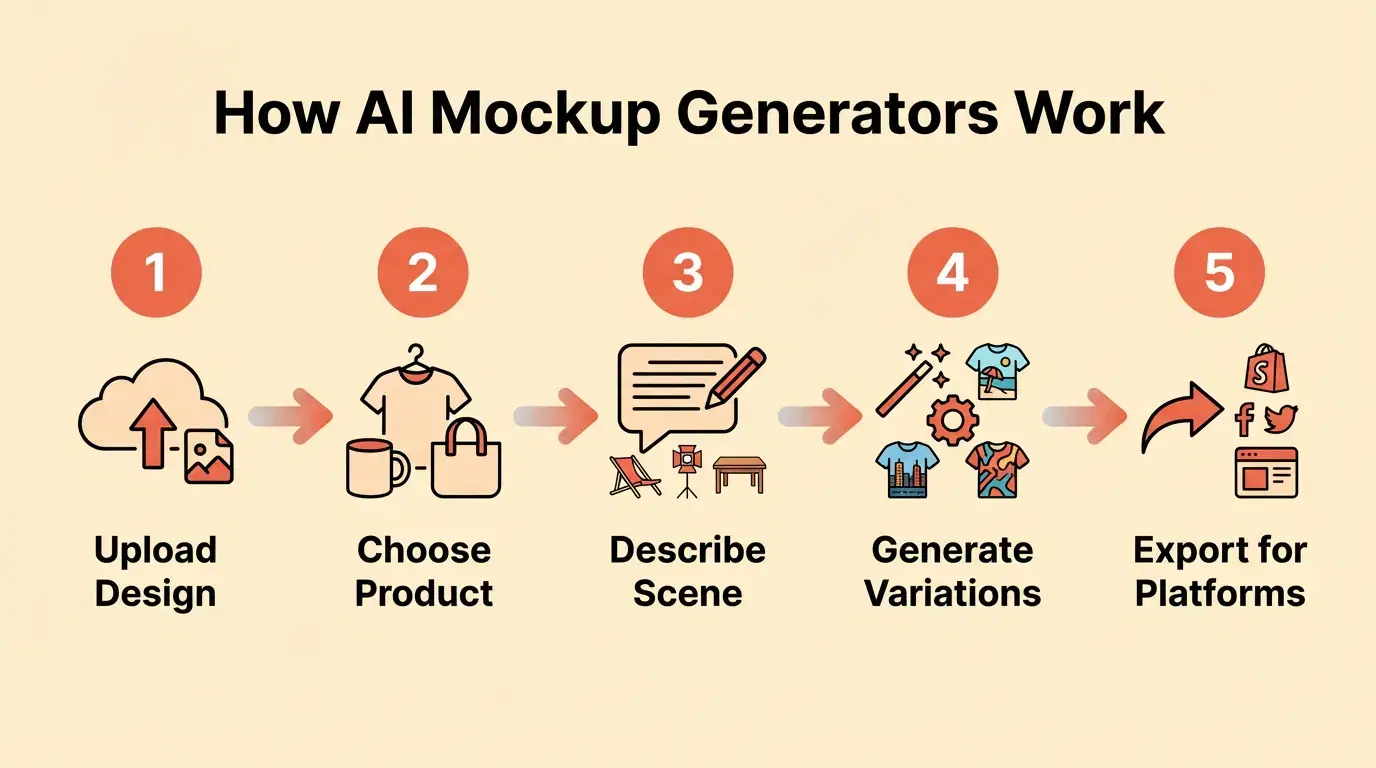
The process starts when you upload your design file and select your product type. The AI analyzes your design colors, style, and composition. You then describe the scene you want or choose from suggested options. Modern AI mockup tools use natural language prompts like "coffee mug on wooden desk in bright home office" or "t-shirt on athletic woman jogging outdoors at sunset."
The AI generates the background scene first, creating realistic environments with proper lighting and perspective. It then renders your product into that scene, automatically handling the technical complexity of making it look natural. Shadows fall correctly. Lighting matches the environment. Colors adjust to the scene's lighting conditions. For apparel on virtual models, the AI ensures fabric drapes realistically and the design placement looks accurate to how the actual product would appear.
Processing time ranges from 10 to 60 seconds depending on the tool and scene complexity. The output is a high-resolution image ready for marketplace listings, formatted to your specifications.
What makes this powerful for POD is the ability to generate demographic-matched virtual models. If you're selling fitness apparel to women in their 30s, you can specify that demographic. The AI generates models that match your target customer, creating instant relatability that generic stock photography can't achieve.
Why AI Mockups Are Essential for Print on Demand Success
In print on demand, you don't have inventory to photograph. But that doesn't mean your product images should look like it.
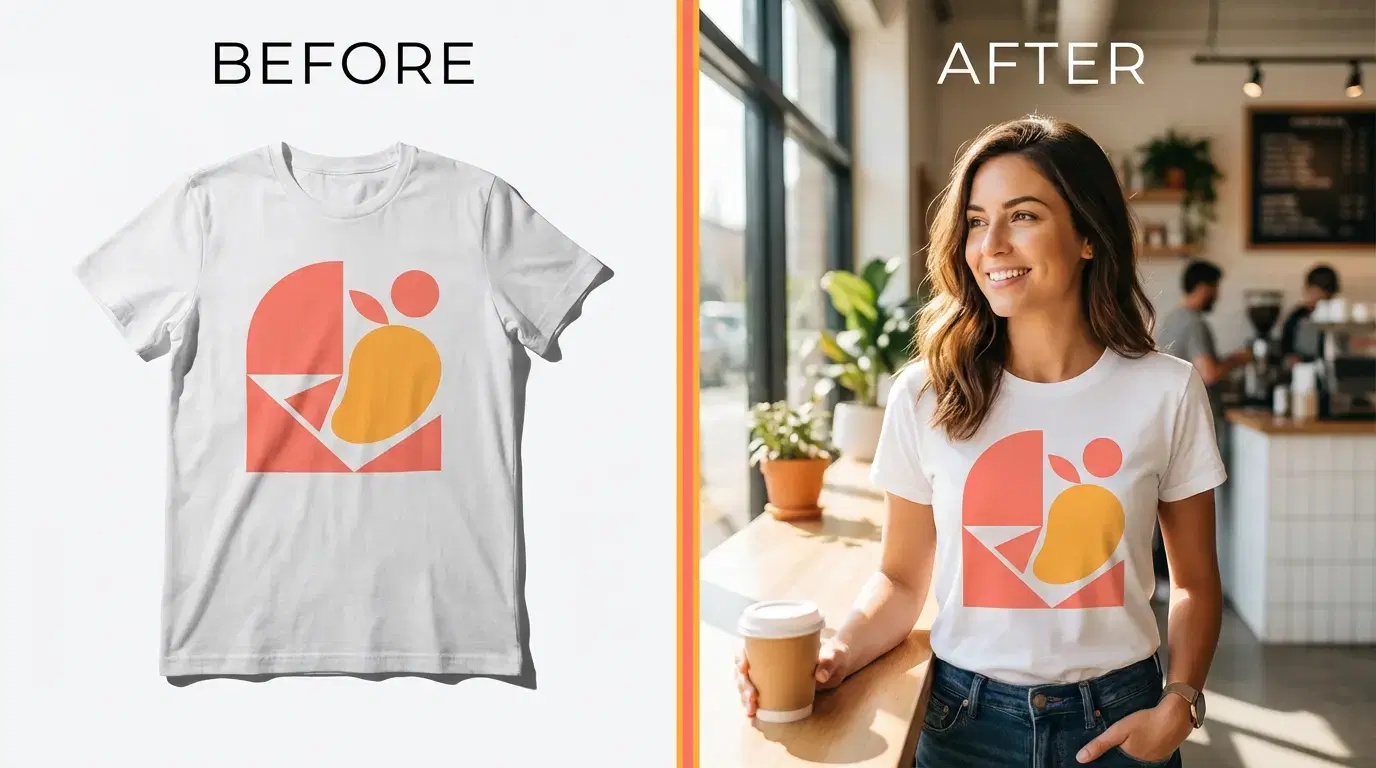
The conversion rate impact is measurable and significant. POD stores average 1.7% conversion according to industry data. Quality mockups increase that conversion rate by up to 50%. Contextual mockups showing products in lifestyle settings demonstrate 60% purchase likelihood versus white background images. Lifestyle mockups specifically convert 30% better than flat product shots.
Here's what that means in real revenue. Consider a POD seller with 1,000 monthly visitors and a $25 average order value. With basic white background mockups at 1.7% conversion, they generate 17 sales and $425 monthly revenue. With AI lifestyle mockups driving a 50% conversion boost to 2.55%, that same traffic generates 26 sales and $650 revenue. The additional $225 monthly revenue compounds to $2,700 annually, providing a 34x return on investment for a $79 monthly AI mockup tool subscription.
The Time-Savings Reality
Time is the other critical factor. Creating professional mockups traditionally consumed hours per product. The comparison is stark:
- Professional photoshoots require 2-4 hours per session and cost $50-200 per mockup. You need physical samples, location scouting, model coordination, and extensive post-processing.
- Manual Photoshop editing takes 15-30 minutes per mockup. You need advanced design skills, expensive software ($23-55 monthly), and the time to learn the tools.
- Template-based mockup tools offer 5-10 minutes per mockup with basic drag-and-drop. They're fast, but your mockups look generic and can't be targeted.
- AI mockup generators process in 10-60 seconds per mockup. No design skills required. Scenes are unique, and you can generate unlimited variations.
For a POD seller creating 20 products with 5 mockup variations each (100 total mockups), the time difference is transformative. Manual Photoshop would consume 25 hours. AI generation takes ~1.5 hours. You save 23.5 hours, which you can reinvest in product development, marketing, or launching more products while trends are still hot.
The Professional Appearance Advantage
Buyers judge product quality by image quality. This isn't fair, but it's reality. A well-designed product with poor mockups underperforms a mediocre design with professional presentation.
Lifestyle mockups build trust by showing products in realistic use contexts. When shoppers see your t-shirt on someone at a coffee shop or your wall art in a styled living room, they visualize owning it. That mental ownership is the psychological driver of impulse purchases.
Virtual models enable audience targeting that stock photography can't match. If your target customer is a 40-year-old professional woman, you can generate mockups showing exactly that demographic. The model's age, style, and setting align with your buyer persona. This relevance creates connection and relatability that drives conversions.
Platform-specific optimization matters more than most sellers realize. Etsy favors lifestyle imagery with authentic, personal aesthetics. TikTok Shop rewards dynamic, eye-catching visuals that stop the scroll. Instagram demands high-aesthetic, cohesive brand imagery. AI mockup generators can create variations optimized for each platform's unique requirements and audience expectations from a single design.
AI Mockups vs Traditional Mockup Methods
Understanding the trade-offs helps you choose the right approach for your POD business.
Professional Photography
Professional photography delivers the highest quality control and complete creative freedom. You photograph real products in real environments with professional lighting and composition.
The downsides are significant. Cost runs $500-2,000+ per photoshoot. You need physical product samples before photography, which adds production time and expense. Scheduling photographers, models, and locations is time-consuming.
Professional photography works best for established brands with high-margin products, existing inventory, and the budget to invest in premium visuals.
Manual Photoshop and Template Editing
Manual editing in Photoshop or similar tools offers complete creative control and no per-mockup costs beyond software subscriptions.
The learning curve is steep, requiring 100+ hours to develop real proficiency. Each mockup still takes 15-30 minutes even for experienced designers.
Template-Based Mockup Tools
Template-based tools like Placeit, Smartmockups, and Canva offer speed (5-10 minutes per mockup) and ease of use.
Templates are reused by thousands of sellers, making your mockups identical to competitors'. Customization is limited to fixed scenes and angles.
AI Mockup Generators (Recommended for POD)
AI mockup generators offer the fastest creation time at 10-60 seconds per mockup. No design skills are required. Every scene is unique and not reused by other sellers. You can generate unlimited variations to test. Virtual models can be matched to your target demographic.
For Vaybel users, the AI Mockup Generator combines the best of all approaches. You get professional quality, unlimited unique scenes, demographic-matched models, and platform-specific optimization, all in under 60 seconds.
How to Create AI Mockups for Print on Demand (Step-by-Step)
Creating AI mockups takes minutes, not hours. Here's the exact process from design file to published listing.
Step 1: Prepare Your Design File
Start with your finalized design exported as a transparent PNG if possible. Recommended resolution is 300 DPI minimum to ensure print quality. Check that file size is under 10MB for most tools.
Vaybel's AI Design Generator automatically exports print-ready files optimized for POD providers, eliminating this technical prep work.
Step 2: Select Your Product Type
Choose your product category (apparel, mugs, wall art, bags, etc.). Select the specific product variant (t-shirt, hoodie, canvas print). Choose product color and variants you want to mock up.
Advanced AI mockup generators like Vaybel's AI Mockup Generator use automatic design placement optimization to ensure perfect positioning every time.
Step 3: Choose Your Mockup Style
You have several mockup style options depending on your goals:
- Lifestyle mockups show products in realistic use scenarios. Use these for your primary listing images.
- Model mockups display virtual models matched to your target audience.
- Flat lay mockups provide clean product-only shots, ideal for thumbnails and minimalist aesthetics.
- 360-degree spin mockups show rotation views to build buyer confidence.
Platform considerations matter here:
- Etsy: lifestyle + flat lay combinations
- TikTok Shop: lifestyle with people and activity
- Instagram: high-aesthetic lifestyle shots
- Amazon: white-background requirements (varies by category)
Vaybel's AI Mockup Generator can generate multiple styles and formats to cover platform needs without duplicating work.
Step 4: Describe Your Scene (AI Generation)
For AI-generated mockups, write clear, descriptive prompts.
Good prompts include:
- Context: "home office desk," "coffee shop," "styled living room"
- Lighting: "natural morning light," "golden hour," "studio lighting"
- Mood: "cozy," "professional," "vibrant," "minimalist"
- Perspective: "eye level," "flat lay," "three-quarter angle," "close-up"
Example strong prompt: "Navy blue t-shirt on athletic woman in her 30s, jogging outdoors at sunset, three-quarter angle, natural lighting."
Step 5: Select Demographic-Matched Models (For Apparel)
For apparel products, specifying model demographics dramatically improves conversion rates.
Choose:
- Age range (20s, 30s, 40s+)
- Gender
- Ethnicity (representation that matches your audience)
- Body type and size
- Style aesthetic (athletic, casual, professional)
Step 6: Generate and Review
Click generate and wait 10-60 seconds for processing. Review the mockup for quality.
Quality checklist:
- Design is clearly visible and properly placed
- Lighting looks natural
- Scene matches your brand aesthetic
- Model (if present) matches target demographic
- Image resolution meets platform requirements
Step 7: Download and Optimize for Platform
Different platforms have different technical requirements.
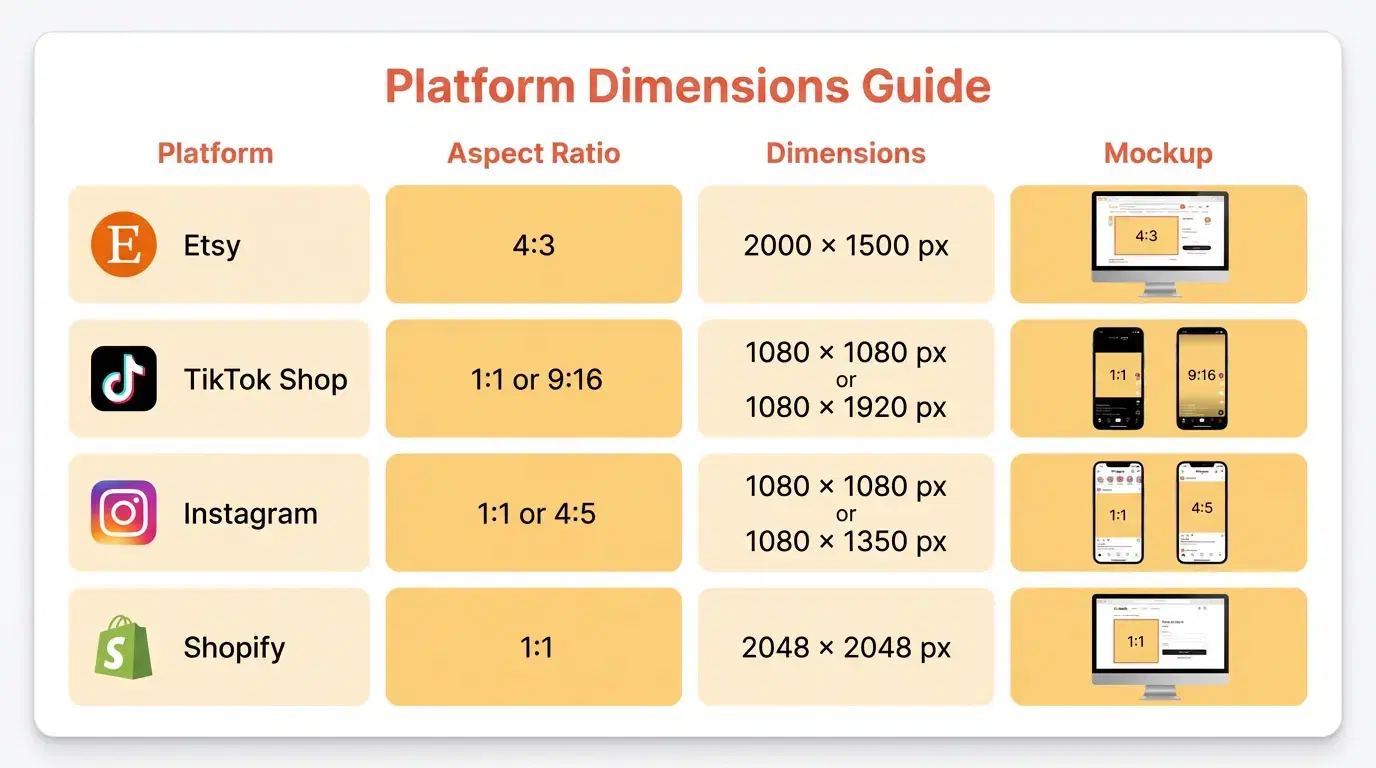
- Etsy: export near 2000px, first image often 4:3, additional images can be square
- TikTok Shop: square (1:1) or vertical (9:16)
- Instagram: 1080×1080 (1:1) or 4:5 for feed
- Shopify: commonly 2048×2048 for crisp zoom
File naming matters for SEO: use descriptive names like ai-mockup-coffee-mug-lifestyle.jpg.
Vaybel's Channel Merchandiser can export the right formats for each platform and help publish optimized listings.
Best AI Mockup Generators for Print on Demand (2026 Comparison)
Not all AI mockup generators are created equal, especially for POD sellers.
Tool 1: Vaybel AI Mockup Generator (Best for End-to-End POD Workflow)
Vaybel offers AI-powered mockup generation with audience-matched virtual models, integrated with AI Design Generator and Channel Merchandiser.
Key features include:
- Virtual model mockups with demographic targeting
- Lifestyle shot generation in under 60 seconds
- Multiple angles (including flat lays and spins where supported)
- One-click multi-platform publishing with optimized formats
- Integrations with Printful and Printify
Pricing: Starter Plan ($19/month, 200 credits, 7-day free trial), Growth Plan ($79/month, 1,000 credits), Enterprise (custom). See pricing for details.
Tool 2: Mockey AI (Best Free Option)
Mockey AI provides a large template library for POD products, free with no watermarks.
Tool 3: Prodigi AI Mockup Generator (Best for Prodigi Users)
Prodigi offers a hybrid approach combining 3D mockups with AI-generated scenes (Prodigi ecosystem).
Tool 4: Dynamic Mockups (Best for Bulk/Enterprise)
Dynamic Mockups provides API-driven bulk mockup generation for high-volume operations.
Tool 5: Canva AI Mockup Generator (Best for General Design Integration)
Canva offers basic mockup creation inside the Canva editor.
Quick Comparison Table
| Tool | Speed | POD-Specific | Platform Integration | Virtual Models | Pricing | Best For |
|---|---|---|---|---|---|---|
| Vaybel | ~60 sec | Yes | Multi-platform | Demographic-matched | $79/mo | End-to-end POD automation |
| Mockey AI | ~5 min | Yes | No | Limited | Free | Budget option |
| Prodigi | ~30 sec | Prodigi only | Prodigi only | No | Included | Prodigi users |
| Dynamic Mockups | Bulk | Yes | Yes | No | Custom | Enterprise |
| Canva | ~2 min | No | No | No | $13/mo | Canva users |
Platform-Specific AI Mockup Requirements
Not every mockup works on every platform.
Etsy Mockup Requirements
Etsy allows mockups for POD products, but they must accurately represent the finished product.
Best practice sequence:
- Lifestyle mockup in use
- Flat lay or close-up of the design
- Additional angles/variants
- Scale reference and detail shots
For more Etsy strategies, see our Etsy POD solution.
TikTok Shop Mockup Requirements
TikTok Shop favors dynamic, lifestyle imagery that looks native in a fast-scrolling feed. Square and vertical formats tend to perform best.
Learn more about TikTok Shop Automation.
Instagram Shopping Mockup Requirements
Instagram is aesthetic-first. Keep a cohesive look across images: consistent lighting, palette, and composition.
Shopify and Custom Store Mockup Strategy
Use a hero lifestyle image plus a gallery of angles, details, and context shots. Consistency across products improves perceived brand quality.
Common AI Mockup Mistakes (And How to Avoid Them)
Mistake 1: Using Generic Prompts
Vague prompts like "product mockup" lead to generic results.
Fix: be specific about mood, lighting, context, and angle.
Mistake 2: Ignoring Platform Requirements
An Etsy-style image uploaded to TikTok can underperform.
Fix: generate platform-specific ratios and styles.
Mistake 3: Mismatched Demographics
If your models don't match your audience, buyers won't relate.
Fix: align model age, style, and setting to the buyer persona.
Mistake 4: Over-Relying on AI (No Quality Control)
Fix: always review placement, clarity, artifacts, and realism.
Mistake 5: Not Testing Mockup Performance
Fix: A/B test mockup styles and track conversion lift per style.
Mistake 6: Forgetting SEO for Image Files
Fix: use descriptive filenames and alt text.
Your Next Steps
Professional mockups used to be a bottleneck for POD sellers. AI changes that equation.
Here's what to do now:
- Audit your current mockups: are they generic and context-free?
- Identify lowest performers: high views, low conversions.
- Generate new lifestyle and/or model mockups for top products.
- Track results for 2-4 weeks and double down on what works.
Template-based mockups are becoming table stakes. AI-generated, audience-matched mockups are the new advantage.
Ready to create professional POD mockups in 60 seconds? Try Vaybel's AI Mockup Generator with a 7-day free trial of the Starter plan ($19/month, 200 credits).