An AI mockup generator helps clothing brands create product and model images from a design and garment reference. In Vaybel, studio and lifestyle mockups stay connected to the product you are preparing to list. Use them to explore presentation, compare angles, and build an image set for your shop.
A mockup is a representation of the product. Check the artwork, garment details, and color in each image, and use a physical sample to verify fit and print quality. Generation time and the number of revisions depend on the job.
Last updated: 2026-09-05
Why Clothing Brand Creators Need an AI Mockup Generator
A small brand needs images that answer practical questions: what is the garment, where is the print, how does it look when worn, and which details matter? A useful gallery combines those answers rather than repeating the same attractive image.
AI mockups can help you explore that gallery before organizing a shoot. They are particularly useful when comparing artwork placement, preparing a new colorway, or trying a setting for a product. Keep sample photography for details that need physical evidence, such as fabric texture, stitching, and the finished print.
Vaybel's Starter plan is $19/month with 200 credits; Growth is $79/month with 1,000 credits. Credits are shared across generation actions, and an image can cost more than one credit. Include revisions when comparing the cost with other ways to produce your gallery.
What Is an AI Mockup Generator for Clothing Brands?
An AI mockup generator creates or edits product imagery using a garment, artwork, or existing image as a reference. Different tools combine image generation, rendered product views, and templates in different ways.
How It Works Under the Hood
For a seller, the useful question is whether the tool preserves the product you selected. In Vaybel, start with the product and design, generate studio mockups, then add lifestyle images where they help show the product.
- Choose the product — Confirm the blank, print method, color, and placement.
- Generate the image set — Review the available studio views and model images.
- Add a setting — Create lifestyle images that fit the product and your brand.
- Review the output — Compare the artwork, seams, silhouette, and color across the set.
Regenerate or leave out images that change the item. Do not infer garment measurements or print durability from generated imagery.
The Four Mockup Classes Every Clothing Brand Needs
Different images have different jobs. A clear front view makes the design readable; an additional angle can show placement; a model image gives styling context; a lifestyle scene helps express the brand. Check the image requirements of the sales channel you use.
Vaybel groups its images into studio and lifestyle sections. The available views depend on the product and generation workflow.
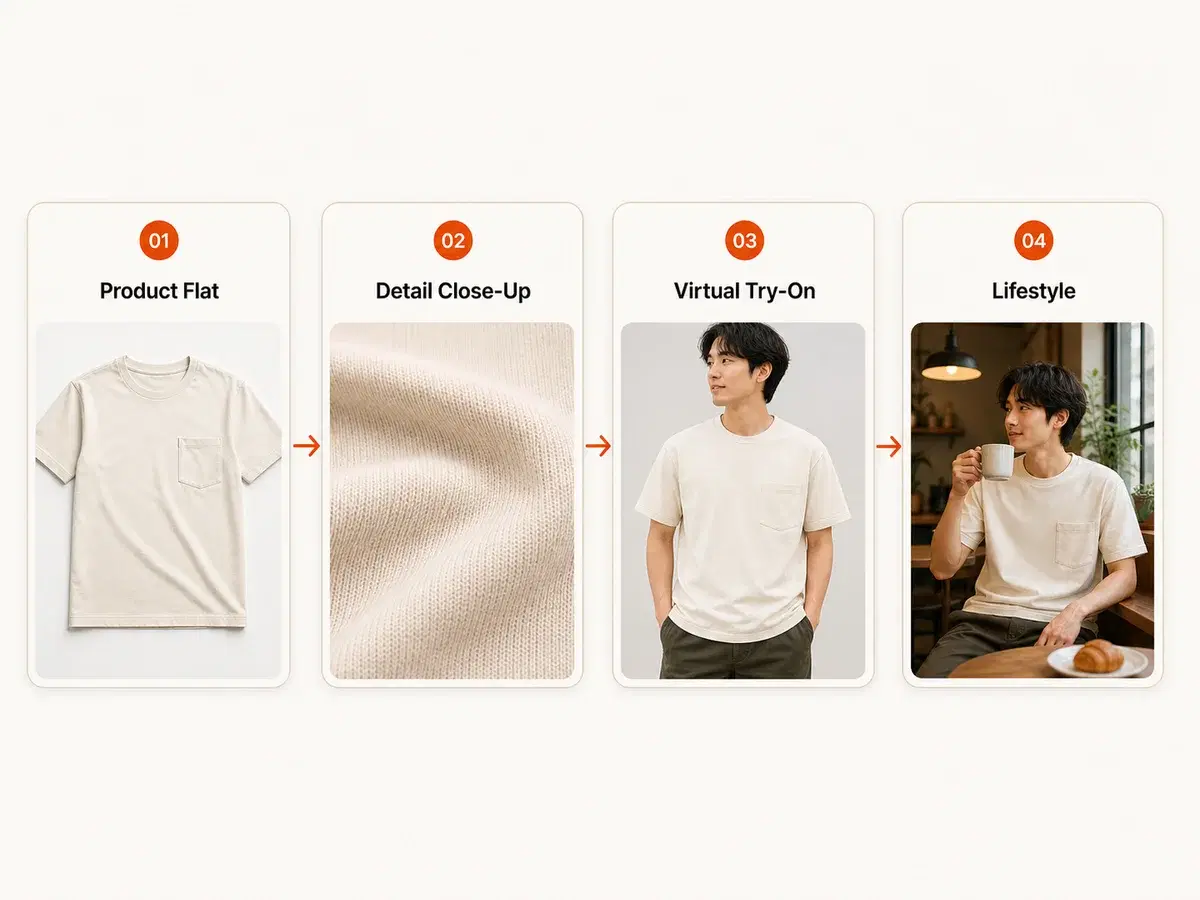
1. Product Flats (The Foundation)
A product flat or clean studio view helps a buyer see the garment and artwork without a busy setting. Keep the product large enough to read on a phone, and compare its color and print placement with the selected blank.
Use the relevant channel's current image requirements when preparing the listing. Generated flats do not guarantee marketplace approval.
2. Detail Close-Ups (The Trust Builder)
A close-up can help show the design and placement. It cannot establish the actual fabric feel, seam construction, wash durability, or quality of the finished print.
For those details, photograph a physical sample. If you include a generated detail image, check it against the original artwork and avoid presenting invented texture or stitching as a product feature.
3. Virtual Try-On (VTO) — The Game Changer
A model image helps a buyer imagine styling the garment. Choose from the options available for the product, then check the neckline, sleeve length, print scale, and silhouette.
A generated model image is not a sizing tool. Keep the provider's size chart in the listing, describe the actual fit of the blank, and use sample measurements when needed. Body proportions and garment details can vary between generated images, so review the set together.
4. Lifestyle Mockups (The Brand Builder)
Lifestyle mockups place the product in a setting such as a studio, courtyard, or street. Choose a setting that suits the audience and leaves the garment easy to see.
Use a consistent brief for lighting, styling, and mood, but review the resulting images individually. Do not assume that a person's identity, the garment's shape, or the print will remain identical across every generation.
AI Mockup Generation: Speed vs. Quality
Compare the images you would actually publish, including the time and credits spent on revisions. A fast first result is less useful if it changes the design.
For each candidate image, check:
- Artwork: text, small shapes, print edges, and placement match the design.
- Garment: the cut, seams, cuffs, and neckline match the blank.
- Presentation: the crop works at phone size and the product remains clear.
- Consistency: the image belongs with the rest of the gallery.
Use the generation options available for that product and check their displayed costs. Save the more elaborate lifestyle work for products where the setting contributes something useful.
Multi-Channel Is the Default for Clothing Brands
You may use the same product across a shop, marketplace listing, and social post, but the image's job changes in each place. A listing image should describe the item clearly; a social image may need a stronger setting or crop.
Vaybel supports listing workflows for connected Etsy, TikTok Shop, and Shopify stores. Its AI Listing Generator helps prepare product copy and selected images for the destination. Review required fields and confirm the published result in the shop.
Keep a clear, high-resolution source image and review each destination's crop. A connection does not make every image suitable for every channel.
AI Mockup Generators vs. Traditional Mockup Tools
Templates and generated imagery solve different presentation problems. Compare them on the product you intend to sell.
Template-Based Tools (The Old Way)
A template gives you a predefined garment, pose, and setting. It can be useful when it accurately matches your blank and preserves the design. Check the license and the fit between the template and your actual product.
AI Mockup Generators (The New Standard)
Generated images offer more freedom to explore a scene and styling direction. That freedom also creates room for errors: altered lettering, different seams, or an inaccurate garment shape. Review the result before using it commercially.
You can combine both approaches with real sample photography. Choose the method that gives the buyer the clearest and most accurate view.
Choosing the Right AI Mockup Generator for Your Clothing Brand
Not all AI mockup tools are created equal. Here's what to look for when evaluating a platform for your brand.
1. Backend Model Quality
Evaluate the output on the garment you intend to sell. Check small lettering, print placement, seams, and fabric texture against the original design and a physical sample. A tool's model name or training claims are less useful than whether it preserves those details in your images.
2. Model Consistency
For a coordinated gallery, use a consistent model and styling brief. Review the generated set together: faces, body proportions, garment details, and colors can vary between images. Regenerate shots that do not fit the set.
3. Export and Channel Support
Check the export dimensions, crop, and destination requirements before committing to a tool. Vaybel keeps selected mockups connected to the listing workflow; inspect the finished listing on the destination channel as well.
4. Pricing That Makes Sense
Vaybel's Starter plan is $19/month with 200 credits and offers a 7-day free trial. The Growth plan is $79/month with 1,000 credits and does not include a free trial. Generation costs vary by action, so use the credit calculator to estimate your image set and allow for revisions.
Compare the cost of the images you actually keep, including revisions, with your photography budget. Physical samples still matter for checking fit, color, and print quality.
The Vaybel Connected Pipeline: Mockups in Context
The Vaybel AI Mockup Generator isn't a standalone tool — it's part of a connected pipeline that moves your designs from concept to checkout without leaving the platform.
-
AI Design Generator — Create or upload your designs with AI-assisted tools. Generate colorway variants, pattern fills, and placement options. Learn more at /features/ai-design-generator.
-
AI Mockup Generator — Generate the available studio and lifestyle images for your chosen product. Check the garment and artwork across the gallery. Explore the AI Mockup Generator.
-
AI Listing Generator / Channel Merchandiser — Prepare selected images and channel-specific product copy, then review the required fields and publishing result. Visit /features/ai-listing-generator.
-
Multi-Channel Publish — Review and publish listings to connected Etsy, TikTok Shop, and Shopify stores. Check each channel's required fields and confirm the published product in the destination shop.
For clothing brands using print-on-demand fulfillment, Vaybel also offers dedicated POD AI solutions at /solutions/print-on-demand-ai.
The Future of AI Mockups for Clothing Brands
Motion is another way to present a product. Vaybel's AI Product Video Generator, available on Growth and above, can turn product assets into short clips. Check the garment and print throughout the video before publishing.
For your current gallery, prioritize an accurate product view over a speculative feature. Keep a record of the source artwork, selected blank, and images you approved so future revisions have a clear reference.
Start Building Your Brand's Visual Identity Today
Start with one product and build a small image set: a clear garment view, an additional useful angle, and a model or lifestyle image where it helps. Compare the set with the design and a physical sample before publishing.
The getting started guide walks through the connected workflow. The Starter plan offers a 7-day trial, requires a card, and renews at $19/month unless canceled before billing. Use the credit calculator to plan your generations and revisions.