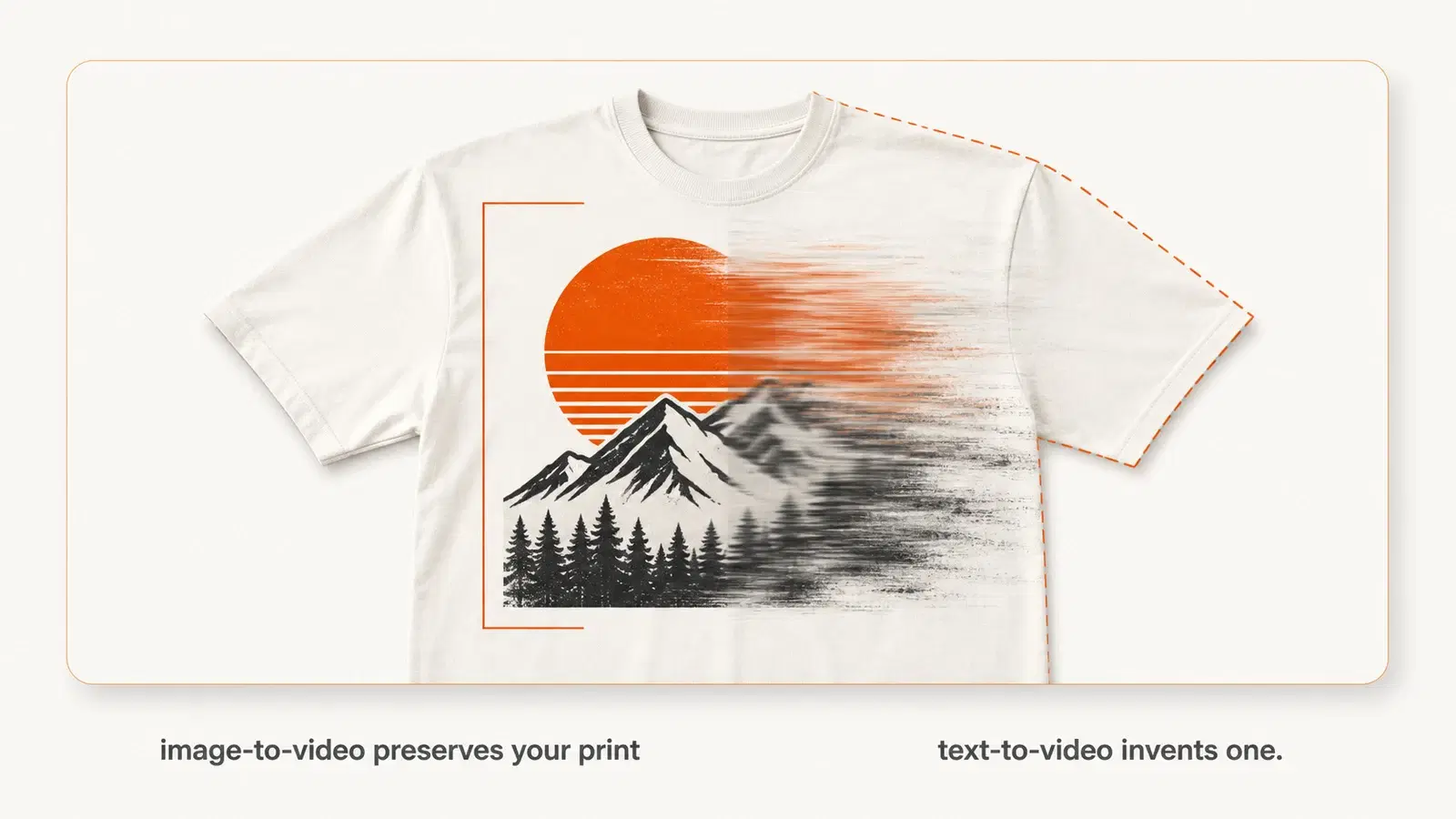
The best AI video generator for clothing depends on one question nobody asks first: does the tool need to preserve your actual printed design? If yes, you want an image-to-video pipeline that starts from a real mockup, like Vaybel or WearView. If you're making brand-mood or ad creative where the garment isn't the hero, general models like Runway, Kling, or Veo do more for less.
Here's the part the tool roundups skip. Your graphic is the product. A general video model will happily melt your logo into abstract texture halfway through a three-second clip, and you won't notice until a customer does.
You already know video sells clothing better than a flat lay. What you probably don't know is which of these tools survives contact with a printed tee, what they really cost once you multiply by a full drop, and that the labeling rules changed in July. This guide covers all three.
If you're looking for the process rather than the tools, our full guide to product videos for clothing brands walks through the whole workflow. This page is about choosing what to buy.
Key Takeaways
- Tool choice comes down to one split: image-to-video pipelines preserve your actual print, while text-to-video models invent a garment that only resembles yours.
- Cheap entry prices mislead. WearView's Lite plan has no video generator at all, and per-video credit costs mean a full drop can cost several times the headline subscription.
- TikTok made AI disclosure mandatory for paid ads on July 21, 2026, and detects synthetic media automatically through C2PA credentials even when you don't self-report.
- Consumer trust is the real constraint, not capability. Shoppers who notice AI content are four times more likely to trust the brand less than more.
- Zalando cut campaign production from weeks to days using generative AI, but its own content lead frames the win as speed and relevance, not quality.
The 8 Best AI Video Generators for Clothing Brands
Pricing verified August 21, 2026. Credit costs matter more than sticker price, so we've noted what a single video actually consumes.
| Tool | Best for | Entry price | Keeps your print? | Publishes to channel? |
|---|---|---|---|---|
| Vaybel | Brands publishing where they sell | Growth: $79/mo | Uses your mockup; review the result | Yes, TikTok/IG/YouTube |
| WearView | On-model garment animation | $24/mo | Yes, from your photo | No |
| Creatify | Paid ad creative at volume | $39/mo | Partial | Meta/TikTok ads |
| Google Veo 3.1 | Cinematic footage with audio | $19.99/mo | No | No |
| Runway | Shot-level creative control | $15/mo | No | No |
| Kling AI | Smallest budget | $10/mo | No | No |
| The New Black | Design-stage fashion video | Credit packs + monthly | Design-dependent | No |
| Luma Dream Machine | Fast iteration at scale | $30/mo | No | No |
Vaybel
Built for clothing brands that need the video to end up inside a live listing, not in a downloads folder. You generate a design, render an on-model mockup, then turn that exact mockup into a social video, so the garment in the clip is the garment you're selling.
The AI Product Video Generator assembles a multi-scene short with voiceover, captions, and music, then exports 9:16, 1:1, and 16:9 and publishes to TikTok, Instagram, and YouTube. A social video costs 40 credits, and the Starter plan includes 200 credits monthly at $19.
Honest limitation: Vaybel doesn't print or ship. That's Printful's job, and the two work together.
Want to see the mockup-to-video handoff? Explore the AI Product Video Generator →
WearView
The closest direct competitor on garment fidelity. Upload a product or model shot, pick a motion template like catwalk, walkthrough, or 360-degree spin, and it animates your real garment.
One catch worth knowing before you subscribe. The Lite plan has no video generator at all, only images. Video starts on the Pro tier at 720p, and each video costs 10 credits at 720p or 20 at 1080p.
Creatify
Aimed squarely at paid social. Paste a product URL, get ad variants with AI actors, push them to Meta or TikTok. The free tier gives 10 credits monthly with watermarked exports, and Starter runs $39 for 100 credits.
Best when you're testing ad angles at volume and the garment is context rather than the subject.
Google Veo 3.1
Strong cinematic output with native synced audio. Access comes through Google AI Pro at $19.99 monthly for Veo 3.1 Fast, or Google AI Ultra at $249.99 for the full model.
It won't hold your print. Use it for brand films and mood pieces where you're selling a feeling.
Runway
The most creative control per shot, with reference-driven generation and a real editing workspace. The free tier gives 125 one-time credits, Standard is $15 monthly for 625 credits, and Pro is $35 for 2,250.
Good if someone on your team actually enjoys directing. Overkill if you want three clips and your evening back.
Kling AI
The cheapest genuine entry point. The free plan provides 66 credits daily, and paid Standard starts at $10 monthly for 660 credits.
Realistic human motion is its strength. Garment accuracy is not.
The New Black
A fashion-native AI design tool with video attached, so it thinks in garments rather than generic footage. It sells both credit packs and monthly subscriptions, so check current pricing before you plan a budget around it.
It shines at the design stage, animating concepts you're still developing. Less useful once you need the physical product on screen.
Luma Dream Machine
Fast, smooth motion and generous credit allocations for iteration. Plus starts at $30 monthly for 10,000 credits, with no free tier.
Pick it when you're generating many variants and picking winners.
Why Most AI Video Generators Ruin a Printed Design
This is the failure mode nobody demos. Understanding it makes the tool choice obvious.
Text-to-Video Invents, Image-to-Video Preserves
When you describe a garment in a prompt, the model generates something plausible from its training data. It's not reproducing your design, it's producing a garment shaped like the words you typed. The graphic will be close, then wrong.
Image-to-video starts from a real still, your mockup or product photo, and animates that specific frame. Your print stays anchored because the model interpolates from pixels you supplied instead of inventing them.
For a clothing brand, that distinction decides everything.
What Actually Breaks
Watch a general model animate a printed tee and the same four failures repeat:
- Text in a graphic smears into approximate letterforms.
- Fine linework dissolves as the fabric moves.
- Logo edges shift position between frames.
- Seams and collar shapes drift.
None of it looks broken enough to notice at a glance. It looks wrong enough that a customer receiving the actual shirt feels misled.
Even sympathetic industry coverage acknowledges the ceiling. AI-generated video still struggles to maintain product accuracy once motion is introduced, which limits commercial use to short clips.
The Mockup-First Pipeline
The workaround is a sequence rather than a setting. Generate or upload your design, render it onto a real blank as a still mockup, verify the print looks right while it's frozen, then animate only that approved frame with short motion and minimal camera movement.
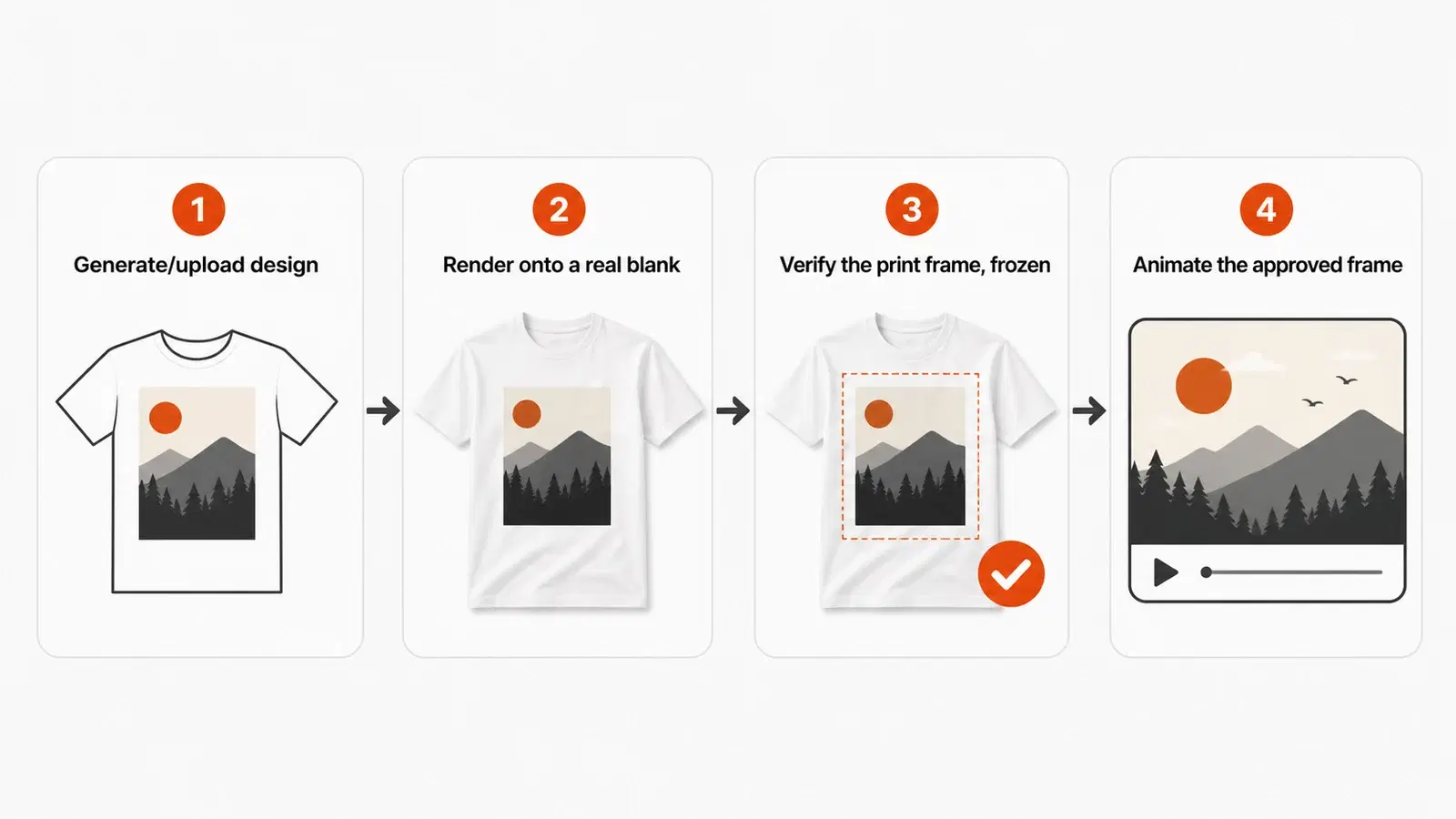
This is also where an AI fashion photoshoot beats a real one on speed. A graphic sitting on a Bella Canvas 3001 renders differently than the same file on a heavyweight Comfort Colors, and you want to catch that while the image is still rather than after a customer sees the video.
Short clips drift less. Every extra second is another chance for your logo to wander.
What These Tools Actually Cost on a Real Catalog
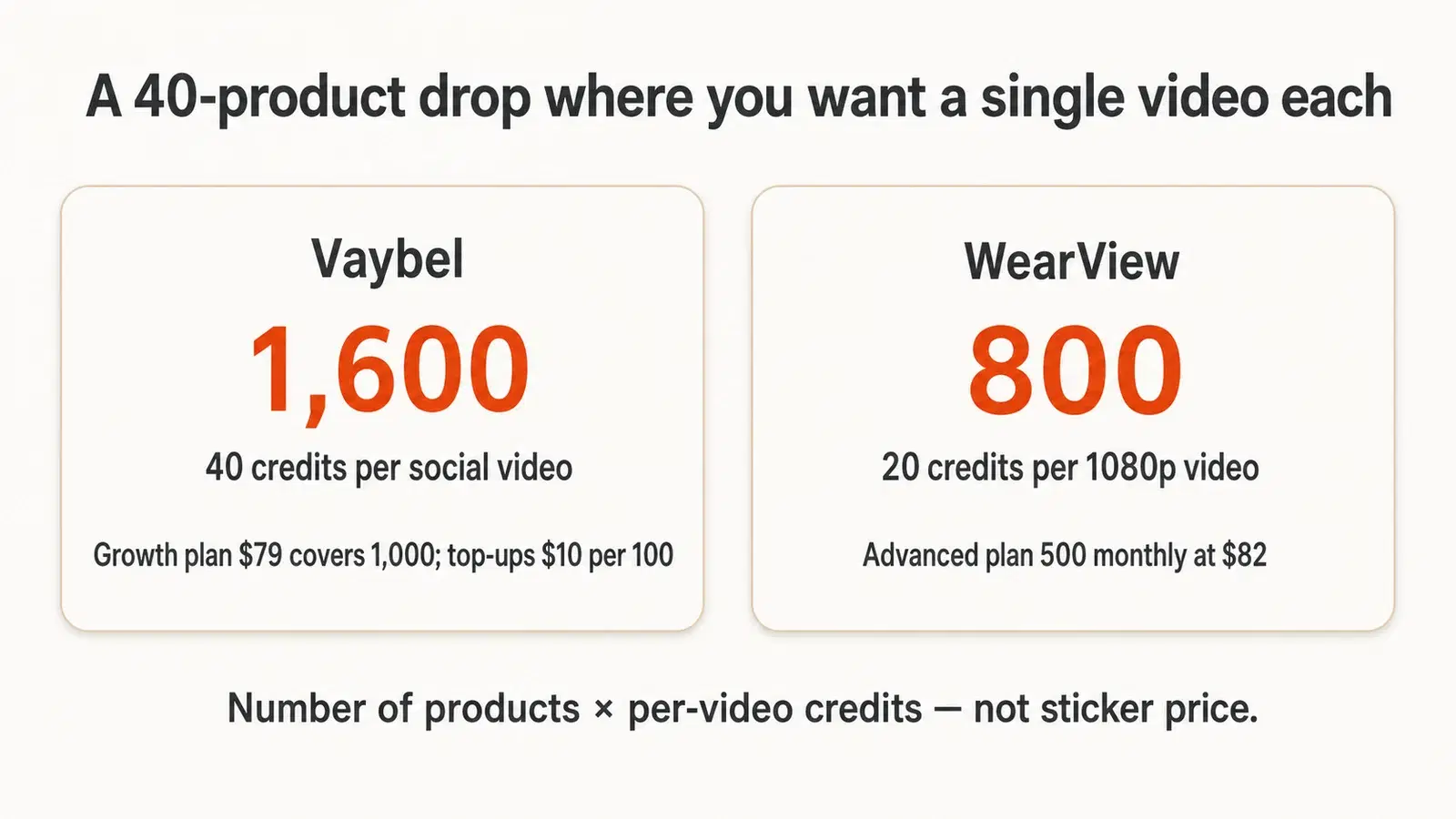
Sticker prices mislead because clothing brands don't make one video. They make one per product, sometimes three.
Take a hypothetical 40-product drop where you want a single video each. On Vaybel at 40 credits per social video, that's 1,600 credits, so the Growth plan at $79 covers 1,000 and you'd add credits at $10 per 100. On WearView at 20 credits for a 1080p video, that's 800 credits against an Advanced plan providing 500 monthly at $82.
The pattern holds across the category. Entry tiers are priced for people making a handful of videos, and clothing brands aren't those people.
Two cost traps worth naming. Watermarks on free tiers make output unusable commercially, and most plans don't roll credits over, so an unused month is money gone rather than banked.
Run your own numbers before committing. Use the ROI calculator →
How to Label AI-Generated Clothing Videos
Every competing roundup skips this. It's now the part most likely to cost you money.
What's Mandatory Versus Encouraged
On July 21, 2026, TikTok updated its advertising policy so that every ad featuring AI-generated imagery, synthetic voices, or realistic digital avatars must carry a disclosure label before it runs. That mandate covers paid advertising through Ads Manager.
Organic posts are different. Disclosure is encouraged and the AIGC toggle exists, but it isn't subject to the same mandatory enforcement. Anyone telling you every AI product image must be labeled is overstating the rule.
Detection Happens Whether You Disclose or Not
TikTok uses C2PA Content Credentials to detect synthetic media automatically, even when it was produced outside TikTok and uploaded later. Self-reporting isn't the only path to getting flagged.
Enforcement escalates. You get a notification with a 24-hour response window, then content removal, reduced reach, For You feed ineligibility, posting restrictions, and account bans for repeat violations.
Separately, the EU AI Act's Article 50 transparency obligations became enforceable on August 2, 2026, requiring machine-readable provenance markers on synthetic output. If you sell into the EU, that applies to you.
The Trust Math Nobody Runs
Compliance is the floor. The ceiling is whether your customers care, and the data says they do.
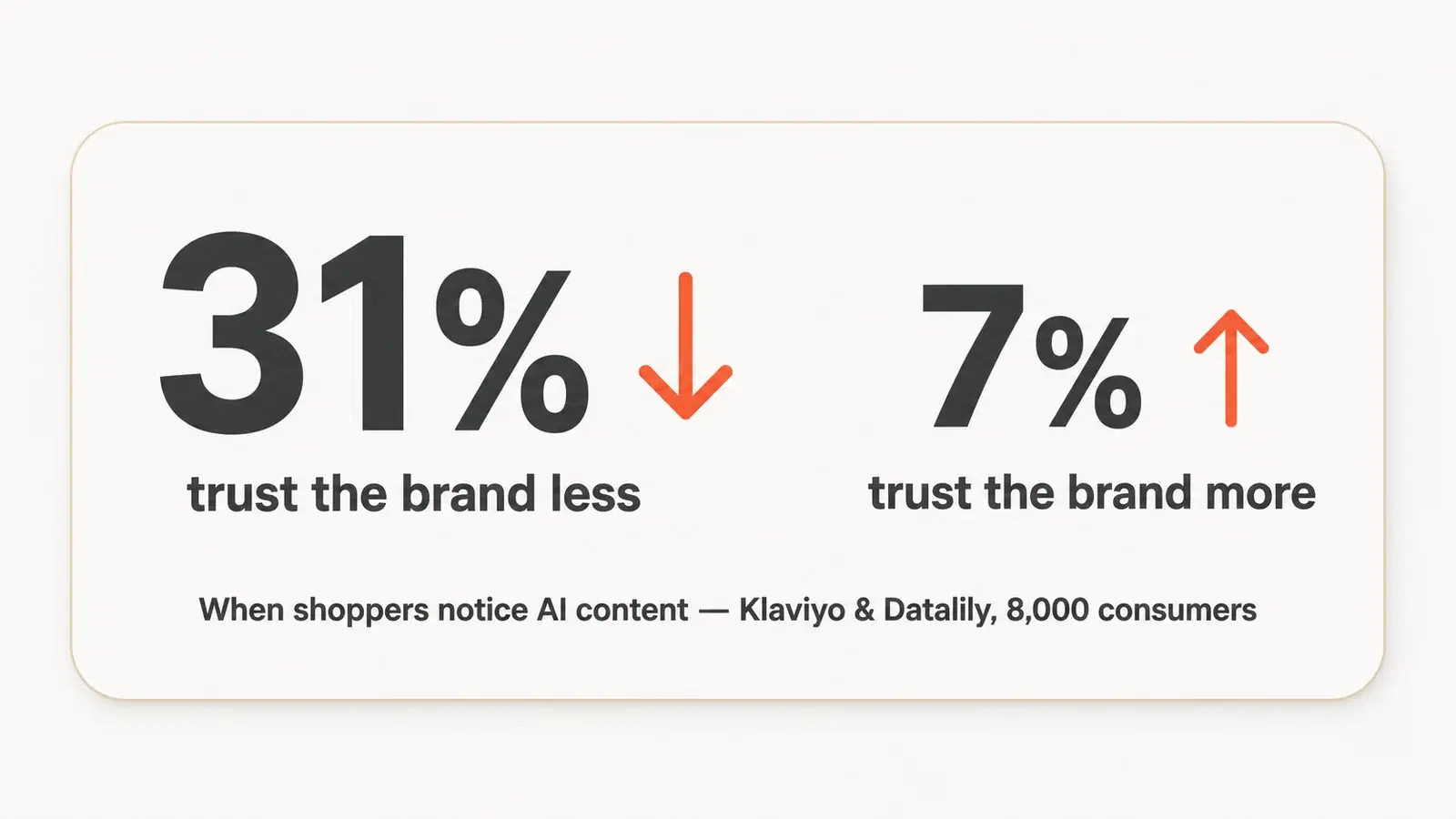
Research from Klaviyo and Datalily surveying 8,000 consumers across eight countries found that when shoppers notice AI-generated content in brand marketing, they're four times more likely to trust the brand less than more, 31% versus just 7%. The same coverage cites YouGov data showing 55% feel uncomfortable with AI-generated brand marketing on social.
Read that carefully, because it isn't an argument against AI video. It's an argument for using AI where the customer doesn't experience it as a substitute for honesty. Animating a real mockup of a real garment is a production shortcut. Inventing a model wearing a garment that doesn't drape that way is a promise you can't keep.
A Short Compliance Checklist
- Label every AI-generated paid ad on TikTok before it runs.
- Toggle AIGC on organic posts using synthetic models or scenes.
- Keep provenance metadata intact rather than stripping it during editing.
- Never AI-generate fit, drape, or fabric behavior you can't deliver.
- Check the current policy before each campaign, since these rules moved twice in 2026.
How to Choose the Right Tool for Your Brand
Four questions, in order. The first one eliminates most of the list.
Does the video need to show your actual garment? If a customer could receive the product and feel misled by the clip, you need image-to-video from a real mockup. That's Vaybel or WearView. If it's mood, brand film, or ad context, the general models open up and cost less.
Where does the video run? Listing videos and organic social have different specs and different disclosure rules than paid ads. If you mainly need an AI video generator for TikTok, prioritize vertical export and direct publishing over cinematic quality, because tools that publish to the channel save a real export-and-upload step on every product.
What's the real per-product cost? Multiply the per-video credit cost by your catalog, not by one. Then check whether credits roll over.
Who owns the output? Read the license before you build a campaign on it, especially on free tiers where watermarks or usage limits may make output commercially unusable.
Zalando offers a useful reality check on what to expect. The retailer generated roughly 70% of its Q4 2024 editorial campaign images with AI, cutting production from six to eight weeks down to three or four days at up to 90% lower cost, according to Reuters. But Matthias Haase, Zalando's Vice President of Content Solutions, framed the win precisely: "It's not because of AI content that is better than human-created content, it is really about how new, how relevant it is."
That's the honest case for an AI video generator for clothing. Not better. Faster, and fast enough to matter when a trend has a 72-hour window.
Frequently Asked Questions
What is the best AI video generator for a clothing brand?
For clothing brands where the printed design is the product, tools that animate a real mockup preserve your graphic. Vaybel and WearView both work this way. For brand and ad creative where the garment isn't the focus, Runway, Kling, and Veo produce stronger cinematic output for less money.
Is there an AI model generator for clothing?
Yes. Several tools generate on-model imagery from a flat product photo, placing your garment on a virtual model. Vaybel's mockup generator and WearView both do this, and the resulting still becomes the anchor frame for video.
Can you use AI images for clothing brands?
Yes, with two limits. Paid TikTok ads require a disclosure label as of July 2026, and you shouldn't depict fit, drape, or fabric behavior your actual garment won't match.
Is there a free AI video generator for clothing brands?
Kling offers 66 free credits daily and Runway gives 125 one-time credits. Creatify's free tier watermarks exports, making them unusable commercially. Free tiers are for testing whether a tool holds your print, not for production.
Do I have to label AI-generated clothing videos on TikTok?
For paid ads through Ads Manager, yes, mandatory since July 21, 2026. For organic posts, disclosure is encouraged rather than mandatory, though TikTok detects synthetic media automatically through C2PA credentials regardless.
Will AI videos keep my printed design accurate?
Only if you use image-to-video from a real mockup. Text-to-video generates a garment resembling your description rather than reproducing your file, so text smears and linework dissolves once motion starts. Keep clips short to limit drift.
Is an AI video clothes changer the same thing?
No, and the difference matters. A clothes changer swaps the garment a person is already wearing in existing footage, which is useful for restyling content you filmed. A garment-preserving generator animates your actual product from a still. If you're selling the design, you want the second one.
How much does an AI clothing video cost per product?
Most tools charge credits per video rather than per month. Budget by multiplying your catalog size by the per-video credit cost, then check whether unused credits roll over, since most plans reset monthly.
Can I make clothing brand videos without a model or a photoshoot?
Yes. Generate an on-model mockup from your design and flat blank, then animate that still. No camera, no model booking, no studio, and the garment on screen matches the file you send to your printer.
The Tool Matters Less Than the Pipeline
Pick based on whether your print has to survive, what a full drop actually costs, and whether you can publish the output legally where you sell.
Three things to carry away. Image-to-video protects your design and text-to-video doesn't. Entry pricing hides the real cost, so multiply by your catalog before subscribing. And labeling is now mandatory for paid TikTok ads, detected automatically, with genuine consumer-trust consequences behind the compliance question.
The brands winning with AI video aren't the ones generating the most clips. They're the ones whose video shows the garment they'll actually ship, published to the channel where someone can buy it, labeled honestly enough that nobody feels tricked.
Start with one product. Render the mockup, check the print while it's still, animate it short, and put it on the listing. Then do the other 39.
Try Vaybel free for 7 days → Full access to AI design, mockups, listings, and multi-channel publishing.