
To set up Shopify print on demand clothing, connect your print provider, then work through seven settings in the Shopify admin: size and color variants, the product category, shipping profiles, delivery times, order routing, taxes and store policies. Finish with a test order. Each one decides something a clothing shopper sees, from the size picker to the delivery date at checkout.
Here's the catch. A print-on-demand shirt doesn't exist until someone orders it, and Shopify's defaults assume it's already on a shelf. Printful, for one, puts its average fulfillment time at 2–5 business days, before the carrier has the package.1 Leave Shopify on its defaults and your checkout can promise a date your provider can't meet.
You've likely connected an app already, or you're about to. This guide skips that part and covers what comes after it: the Shopify side of a clothing store, setting by setting, with what to pick and why.
Key Takeaways
- Shopify allows 3 options and up to 2,048 variants per product, but some themes and apps stop at 100. Listed in every color and size on Printful, all five common blanks we checked pass 100.23
- Categorize every product. Shopify uses the category to apply clothing tax exemptions in seven states, and all variants of a product share one category.4
- Made-to-order delivery is fulfillment time plus transit time. Printful's average of 2–5 business days to fulfill plus 3–4 for Flat Rate US shipping means 5 to 9 business days to the door, before any holiday rush.1
- Your return policy can pull its terms from Shopify's return rules. Print providers cover misprints and damage, not a shirt ordered in the wrong size.56
- Run two tests: a checkout test with Shopify's test gateway, then one real order you pay for. Shopify's advice is to cancel and refund a real test order; we'd let it ship as your sample.78
Before You Start: What This Guide Leaves to Other Posts
This guide assumes three things are settled, and each has its own post.
- Why Shopify, and what it costs. Plans, launch budget, where traffic comes from and print on demand vs inventory are in our guide to starting a clothing brand on Shopify.
- Which provider. Prices, print quality, labels and how each app syncs with Shopify are in Printful vs Printify for Shopify brands.
- Connecting and publishing. If you build products in Vaybel, the Vaybel Shopify integration guide covers connecting the store, linking Printful or Printify and publishing listings.
Everything below happens in your Shopify admin, whichever tools made the product.
Step 1: Set Up Size and Color Variants That Work
Every clothing product in Shopify is a set of variants. "Each product can have up to 3 options," Shopify's help center says, and you can create up to 2,048 variants for one product.2 For a tee, two options do the job: Size and Color.
Order matters here. Put Size first and enter sizes in wearing order (S, M, L, XL, 2XL), because shoppers read the picker left to right.
The Theme Limit Most Clothing Stores Hit Without Knowing
The 2,048 limit is generous. The catch sits lower. Shopify warns that "some third-party themes might not support more than 100 variants," and the same goes for some custom apps.2
A full print-on-demand color run crosses that line fast. We counted the variants Printful's catalog lists for five blanks clothing brands use most, on November 27, 2026.3
| Blank | Variants on Printful |
|---|---|
| Bella+Canvas 3001 tee | 6283 |
| Comfort Colors 1717 tee | 3503 |
| Gildan 5000 tee | 2763 |
| Gildan 18500 hoodie | 1923 |
| Cotton Heritage M2580 hoodie | 1483 |
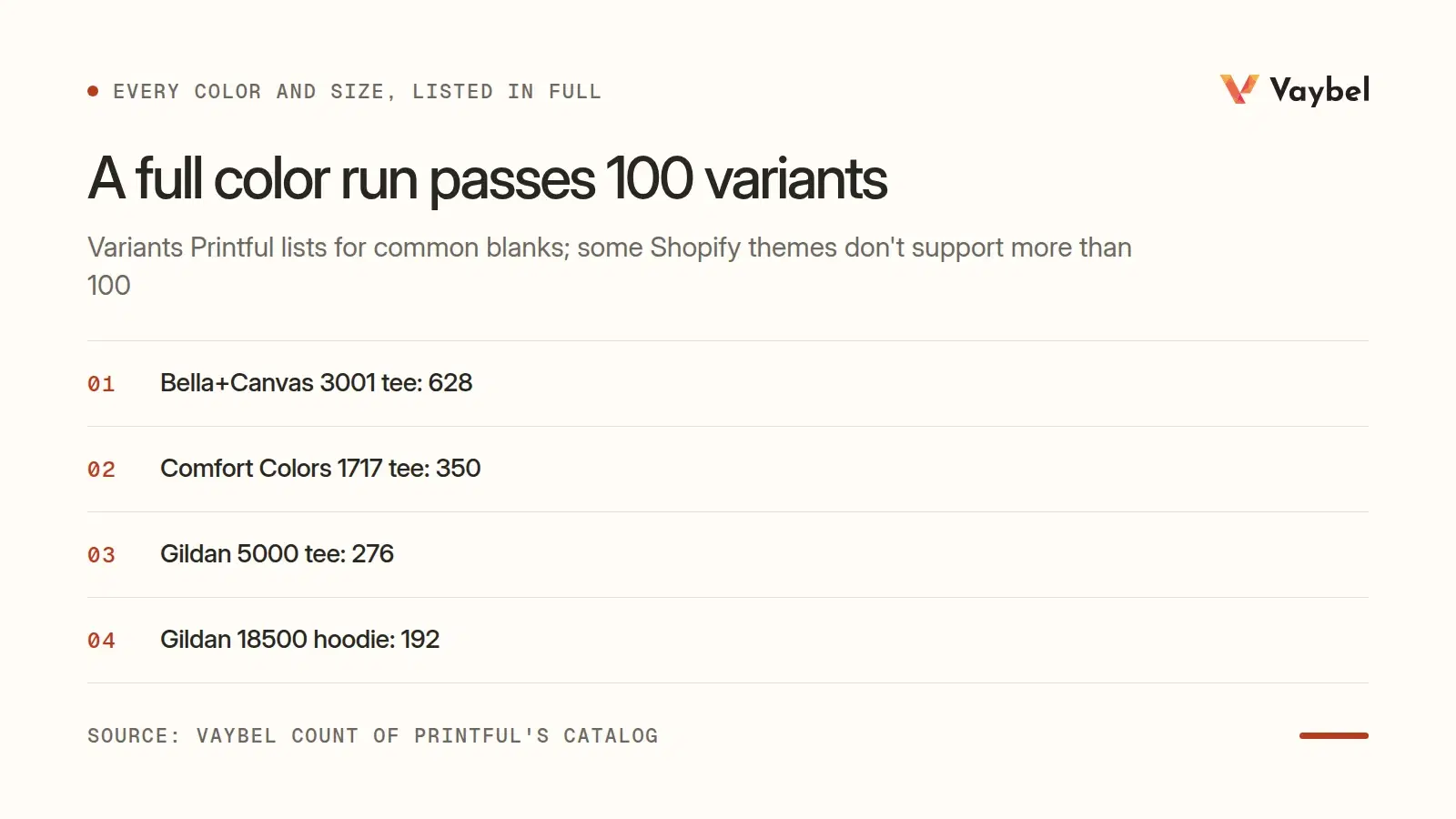
Every one is over 100 if you list it in every color and size.3 That's why a curated color range is the better setup, not only a style choice. A handful of colors you'd actually wear keeps the picker short and keeps every app and theme inside its limits.2
Vaybel builds products this way. A Vaybel listing carries up to six garment colors, each with its full size range, and a Bella+Canvas 3001 in six colors from XS to 5XL comes to at most 54 variants.93
Give Every Color Its Own Photo
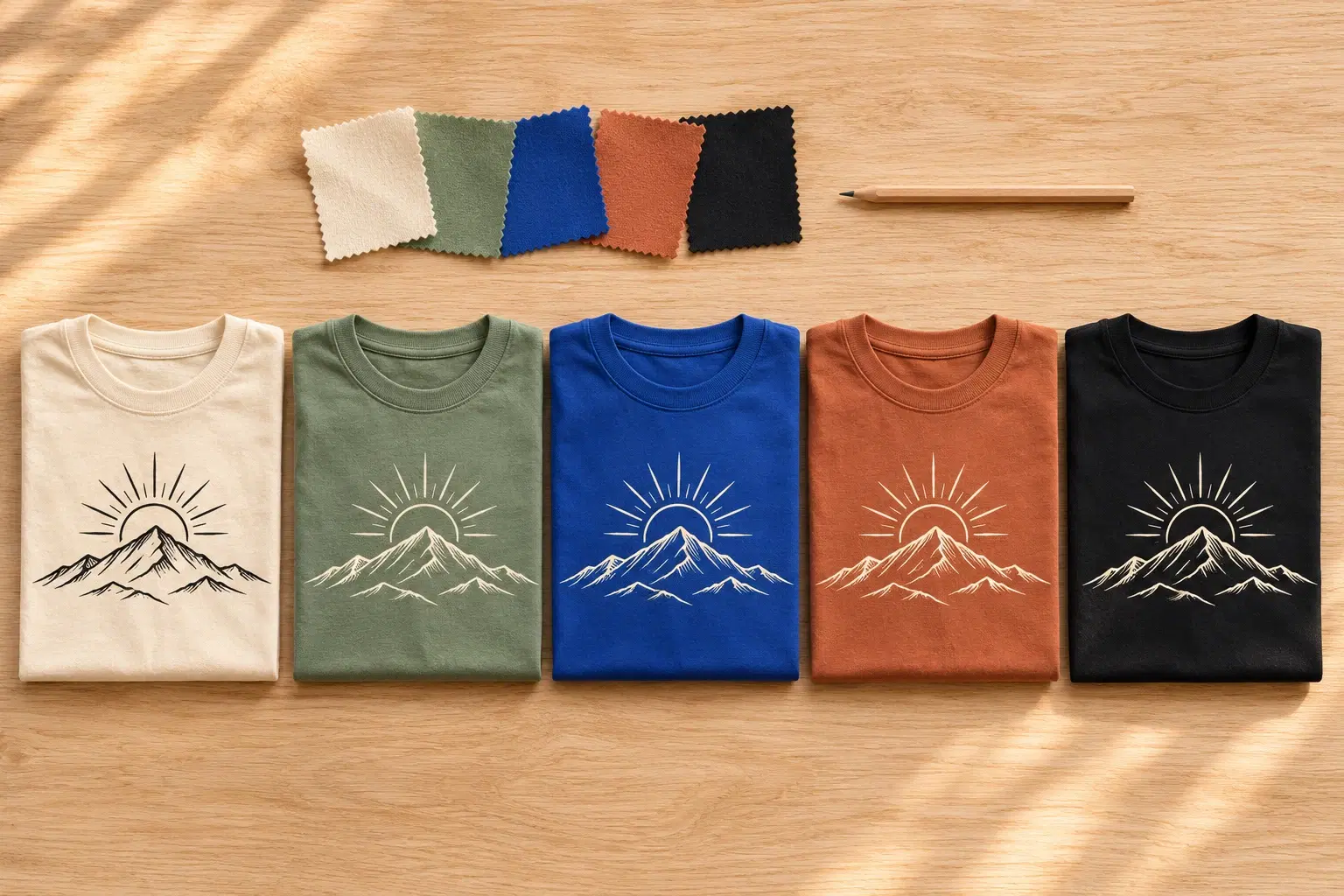
When a shopper taps Navy, the main image should turn navy. Shopify lets each variant carry one image from the product's media, and a product can hold up to 250 media items.2 Assign each color's front photo to that color's variants, so the photo changes when the color does.
Price large sizes on their own, too. Each variant carries its own price, so a 2XL can cost the shopper more than a medium.2 Our Printful vs Printify comparison shows how provider prices climb with size.
Want the variants built for you? With Printful, Vaybel creates the Size and Color options in size order and attaches each color's photo to its variants. See how Vaybel works with Shopify →10
Step 2: Categorize Every Product (It Sets the Tax)
The product category looks like a filing choice. It isn't. Shopify puts it plainly: "When a product is categorized correctly, the most accurate tax rate is collected at checkout."11
Pick the category from Shopify's Standard Product Taxonomy, such as Apparel & Accessories > Clothing > Clothing Tops > Shirts. That unlocks category metafields for clothing, such as size, neckline, sleeve length type, age group, fabric, target gender and color.11 Fill them in, because they feed store filters and channels like Google.
You can also connect a category metafield to a variant option. The option then draws its values from the metafield, so Color and Size stay consistent across the catalog.112
Two clothing rules to know:
- Variants share one category. "Variants of a single product share the same product category," Shopify says. If adult and youth sizes are taxed differently where you sell, make them separate products.4
- You're responsible for the category. Shopify's tax page says "it's your responsibility to verify that your product categories are correct, including those that are automatically suggested in your Shopify admin." Check the category Shopify suggests before you accept it.4
With Printful, Vaybel sets the matching category from Shopify's taxonomy when it publishes. On the Printify path, Printify's settings decide it.10
Step 3: Build Shipping Profiles for Made-to-Order Clothing
"A shipping profile is a set of shipping rules for specific products and locations," Shopify explains. Every product starts in the general profile, and you can create up to 99 custom profiles for products that ship differently.12
Your print provider shows up here as a location. "Apps that manage fulfillment, such as Printful, are automatically added as a location to your shipping profile," Shopify notes, and they can turn off transit time on your existing rates.13 So open Settings > Shipping and delivery after you install the app and see what changed.
Flat Rates or Calculated Rates?
You have two ways to charge shipping.
- Flat rates you set yourself, per shipping zone. They work on every plan, and you can name them anything.
- Third-party calculated rates come from a carrier account or app at checkout. Third-party carrier-calculated shipping is "available on Shopify Advanced and Shopify Plus plans," and Grow stores can add it for a monthly fee or with annual billing.14
On Basic or Grow without the add-on, flat rates are the realistic choice. Base them on what your provider charges you. Printful's Flat Rate shipping is set from the average shipping cost of each product category.1
When to Make a Second Profile
Most print-on-demand clothing stores need one profile. Shopify's custom profiles are for products that need different shipping rates.12 For a clothing store, that might be heavier hoodies that cost more to ship than tees, or items you ship yourself.
Shopify's own walkthrough of creating a shipping profile: How to set up a shipping profile, Shopify Academy on YouTube.
Step 4: Show Delivery Times a Made-to-Order Shirt Can Meet
This is the setting that most separates a print-on-demand clothing store from a stocked one. Shopify's own warning is short: "Don't promise delivery or shipping times that you can't provide."15
Delivery has two parts. Fulfillment time is how long until the package reaches the carrier, and transit time is the trip after that. Shopify says it directly: "Transit time doesn't account for order processing time."1316
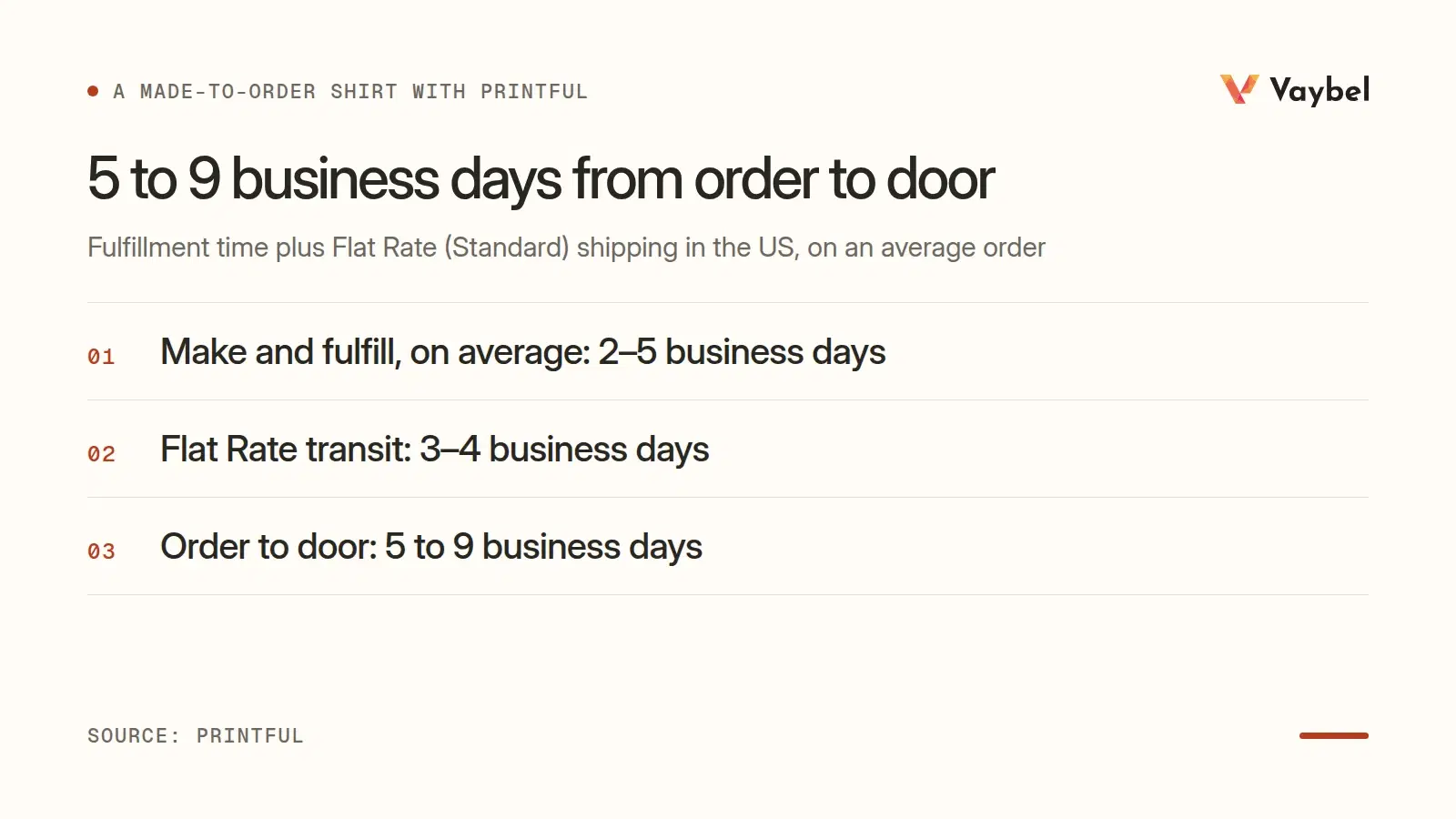
Here's the math with Printful. Its fulfillment time averages 2–5 business days, and Flat Rate (Standard) in the US and Canada takes 3–4 business days after fulfillment.1 That's 5 to 9 business days from order to door on an average order, and that range belongs in front of the shopper. In the holiday rush, add a buffer.
Shopify gives you three places to say it:
- Estimated delivery dates. Shopify lets you set a fulfillment time and show delivery dates at checkout. Manual dates use the fulfillment time and transit time you enter.16
- The rate itself. A custom flat rate can carry a delivery description, though not a custom transit time.13 Write the promise into it, such as "Made to order. Arrives in 5 to 9 business days."
- Your shipping policy. Shopify's shipping policy can insert your fulfillment time, such as "2 business days," from your delivery date settings.15 Set it to the top of your provider's range, not the bottom.
Put the same wording on the product page. Vaybel writes its Shopify descriptions to include a Made to Order note with the production time in the description, and you can add the same line to products you build elsewhere.10
Step 5: Check Order Routing (Only If You Have Two Locations)
"Order routing applies rules in sequence to prioritize locations and determine where to fulfill each order," Shopify explains, and it "requires 2 or more active locations."17 A store where one provider makes everything has nothing to route.
It matters once you add a second location, such as a second provider or stock you ship from home. The default rules try to avoid splitting orders, stay in the buyer's market and ship from the closest location.17 Make sure each product is stocked only at the location that can make or ship it, so an order never lands somewhere that can't fill it.
Step 6: Set Up Sales Tax for a Clothing Store
US sales tax starts with registration. Shopify's setup guide says that after you've registered with the tax agencies and have your sales tax ID, you can set up collection: go to Settings > Taxes and duties > United States, add the state and enter your sales tax ID.18 Ask an accountant where you need to register.
Clothing gets special treatment in several states. Shopify Tax applies clothing exemptions in Massachusetts, Minnesota, New Jersey, New York, Pennsylvania, Rhode Island and Vermont, as long as your products are in the right category.4 Each state has its own thresholds, and Shopify updates the rules on its side.
Two settings can override that work. A tax override always beats the category calculation, and a wrong category gives the wrong rate.4 If you set categories in Step 2, check one product's tax at checkout during your test order.
Step 7: Write the Store Policies a Clothing Store Needs
Shopify lets you add a return policy, privacy policy, terms of service, shipping policy, legal notice, contact information and a subscription policy. Once added, they're linked in the footer of every checkout page, and the shipping policy is linked from product pages and the cart.15
Shopify can write some of them for you. Automated policies cover returns, terms, shipping and contact information, and they update when your settings change.15 Shopify also says those templates "aren't legal advice," so read them as a draft.15
Returns: Set the Rules, Then the Policy Follows
A clothing return policy has to answer one question first: what happens when the size is wrong? Your print provider won't help with that one. Printful and Printify cover misprints and damage reported within 30 days of delivery, and neither takes back a shirt because it didn't fit.619
Shopify's return rules let you set the answer once:
- Return window: none, 14, 30 or 90 days, unlimited, or custom.5
- Return shipping: free, a flat fee, or the customer buys the label.5
- Restocking fee: a percentage of the return.5
- Final sale items: products that can't be returned, such as personalized pieces.5
"The return terms in your return and refund policy come from your return rules," Shopify says, as long as the automated policy is on.15 A returned print-on-demand shirt can't go back to your provider, so price that into the rules you choose.
Put Sizing in the Policy and on the Page
Most wrong-size returns start on the product page. Link a size chart from every product and name the blank's fit, such as unisex or relaxed. Our blank sizing guide shows how the common blanks measure.
With Printful, Vaybel adds the blank's size chart as the last product image. With Printify, add your size information in Shopify.10
Step 8: Place a Test Order Before Launch
A print-on-demand store needs two tests, because one checks the checkout and the other checks the shirt.
Test 1: the checkout. Turn on Shopify's Test payment gateway (search "Bogus" in Settings > Payments) or Shopify Payments test mode. With the test gateway, enter 1 as the card number to approve, 2 to decline and 3 for a gateway failure.7 Before you start, Shopify says "if you use an app that automatically fulfills orders, then deactivate it before you create test orders."20 Pause automatic fulfillment in your provider app's settings rather than uninstalling it, which would remove its sync.
Then check what a shopper sees:
- Size and color pick the right variant, and the photo follows the color.
- The shipping rate shows its name and your made-to-order wording.
- Tax looks right for your test address.
- Policy links sit in the checkout footer.
Turn test mode off when you're done. "Customers can't place live orders with a credit card during the time that your payment providers are in test mode."7 Don't fulfill a test order either, since you're charged for any shipping labels you buy.20
Test 2: a real order. First, turn test mode off and switch your provider app's automatic fulfillment back on. Shopify's own method is to place an order with a real payment provider, then cancel and refund it as soon as possible.8
We'd go one step further: order one shirt to your own address, pay with your own card, and let it ship. It's the only test that shows the order reaching your provider, made in the right size and color, and arriving inside the window you promised.
That order is also your sample. Our Shopify integration guide covers what to check on the provider's side before the first customer order arrives.
Your Shopify Print on Demand Launch Checklist
| Setting | Where in Shopify | Clothing-store choice |
|---|---|---|
| Variants | Products > a product > Variants | Size first, in wearing order; a curated color range under 100 variants2 |
| Variant photos | Product media | One front photo per color, assigned to its variants2 |
| Category | Products > a product > Category | The exact clothing category, metafields filled in11 |
| Shipping profiles | Settings > Shipping and delivery | One profile; a second only for products that ship differently12 |
| Delivery wording | Rates, delivery dates, shipping policy | The top of your provider's fulfillment range plus transit time161 |
| Order routing | Order routing settings | Check only with 2 or more locations17 |
| Taxes | Settings > Taxes and duties | States where you're registered18 |
| Policies | Settings > Policies | Returns from return rules, with a clear wrong-size answer155 |
| Test orders | Settings > Payments | A test-gateway checkout, then one real order78 |
FAQ: Shopify Print on Demand Clothing
Does Shopify do print on demand itself?
No. Shopify is the storefront and checkout. A print-on-demand app such as Printful or Printify makes and ships each order, and its app appears in Shopify as a fulfillment location.13
How many sizes and colors can one Shopify product have?
Up to 3 options and 2,048 variants per product. Some themes and apps don't support more than 100 variants, so check yours before listing a full color run.2
What delivery time should a print on demand clothing store show?
Show production time plus shipping time. With Printful's Flat Rate shipping in the US, that's an average of 2–5 business days to fulfill plus 3–4 business days in transit. Add a buffer in the holiday rush.1
Do I need Shopify Advanced for print on demand shipping rates?
Not for flat rates, which work on every plan. Third-party calculated rates need Shopify Advanced or Plus, or a paid add-on or annual billing on Grow.14
Do Printful and Printify accept returns for the wrong size?
No. Both cover misprints and damage reported within 30 days of delivery. A wrong-size return is covered by your own return policy.619
How do I test a Shopify print on demand store without paying?
Use Shopify's Test payment gateway or Shopify Payments test mode, and turn off any app that fulfills orders automatically first. To test the whole chain, turn test mode off, switch automatic fulfillment back on and place one real order to your own address.7208
Set It Up Once, Then Launch
The Shopify side of a print-on-demand clothing store is one afternoon of settings, and each one shows up in front of a shopper. Variants decide the size picker. The category decides the tax. The shipping profile and delivery wording decide the date at checkout, and the return rules decide what a wrong size costs you.
Do them in order, run both test orders, and wear the sample before you send anyone to the store. Then the hard part starts: filling the catalog and finding buyers, which our Shopify clothing brand guide covers.
Building the catalog next? Vaybel turns a design into finished Shopify listings with mockups, copy and variants, plus a size chart on the Printful path. Start the 7-day Starter trial →
Sources
Footnotes
-
Printful, "Shipping Speeds & Pricing," read November 27, 2026, https://www.printful.com/shipping ↩ ↩2 ↩3 ↩4 ↩5 ↩6
-
Shopify Help Center, "Adding variants," read November 27, 2026, https://help.shopify.com/en/manual/products/variants/add-variants ↩ ↩2 ↩3 ↩4 ↩5 ↩6 ↩7 ↩8 ↩9 ↩10
-
Vaybel count of Printful's catalog, November 27, 2026: variant counts for products 71 (Bella+Canvas 3001), 586 (Comfort Colors 1717), 438 (Gildan 5000), 146 (Gildan 18500) and 380 (Cotton Heritage M2580) from https://api.printful.com/products/71 and the matching product pages of the same API. ↩ ↩2 ↩3 ↩4 ↩5 ↩6 ↩7 ↩8 ↩9
-
Shopify Help Center, "Product categories for Shopify Tax," read November 27, 2026, https://help.shopify.com/en/manual/taxes/shopify-tax/product-categories-tax ↩ ↩2 ↩3 ↩4 ↩5
-
Shopify Help Center, "Setting up return and cancellation rules," read November 27, 2026, https://help.shopify.com/en/manual/fulfillment/managing-orders/returns/return-rules ↩ ↩2 ↩3 ↩4 ↩5 ↩6
-
Printful Help Center, "What is Printful's return and refund policy?," updated October 18, 2026, https://help.printful.com/hc/en-us/articles/50263870468753-What-is-Printful-s-return-and-refund-policy ↩ ↩2 ↩3
-
Shopify Help Center, "Activating a payment gateway in test mode," read November 27, 2026, https://help.shopify.com/en/manual/checkout-settings/test-orders/payments-test-mode ↩ ↩2 ↩3 ↩4 ↩5
-
Shopify Help Center, "Processing a test order," read November 27, 2026, https://help.shopify.com/en/manual/checkout-settings/test-orders/processing-test-order ↩ ↩2 ↩3 ↩4
-
Vaybel Docs, "Add More Garment Colors," https://vaybel.com/docs/launch-workflow/add-colorways ↩
-
Vaybel, "Vaybel Shopify Integration: Connect Your Store and Publish," https://vaybel.com/blog/shopify-vaybel-integration ↩ ↩2 ↩3 ↩4
-
Shopify Help Center, "Shopify's Standard Product Taxonomy," read November 27, 2026, https://help.shopify.com/en/manual/products/details/product-category ↩ ↩2 ↩3 ↩4
-
Shopify Help Center, "Shipping profiles," read November 27, 2026, https://help.shopify.com/en/manual/fulfillment/setup/shipping-profiles ↩ ↩2 ↩3
-
Shopify Help Center, "Setting up transit time for flat shipping rates," read November 27, 2026, https://help.shopify.com/en/manual/fulfillment/setup/shipping-rates/transit-time ↩ ↩2 ↩3 ↩4
-
Shopify Help Center, "Third-party carrier-calculated shipping," read November 27, 2026, https://help.shopify.com/en/manual/fulfillment/setup/shipping-rates/third-party-carrier-calculated-shipping ↩ ↩2
-
Shopify Help Center, "Adding store policies," read November 27, 2026, https://help.shopify.com/en/manual/checkout-settings/refund-privacy-tos ↩ ↩2 ↩3 ↩4 ↩5 ↩6 ↩7
-
Shopify Help Center, "Fulfillment time and delivery dates," read November 27, 2026, https://help.shopify.com/en/manual/fulfillment/setup/delivery-expectations ↩ ↩2 ↩3
-
Shopify Help Center, "Order routing," read November 27, 2026, https://help.shopify.com/en/manual/fulfillment/setup/order-routing ↩ ↩2 ↩3
-
Shopify Help Center, "Setting up US taxes," read November 27, 2026, https://help.shopify.com/en/manual/taxes/us/us-tax-setup ↩ ↩2
-
Printify, "Terms of Service," last updated September 17, 2026, https://printify.com/terms-of-service/ ↩ ↩2
-
Shopify Help Center, "Testing Shopify Payments," read November 27, 2026, https://help.shopify.com/en/manual/payments/shopify-payments/testing-shopify-payments ↩ ↩2 ↩3