Last updated: 2026-08-24
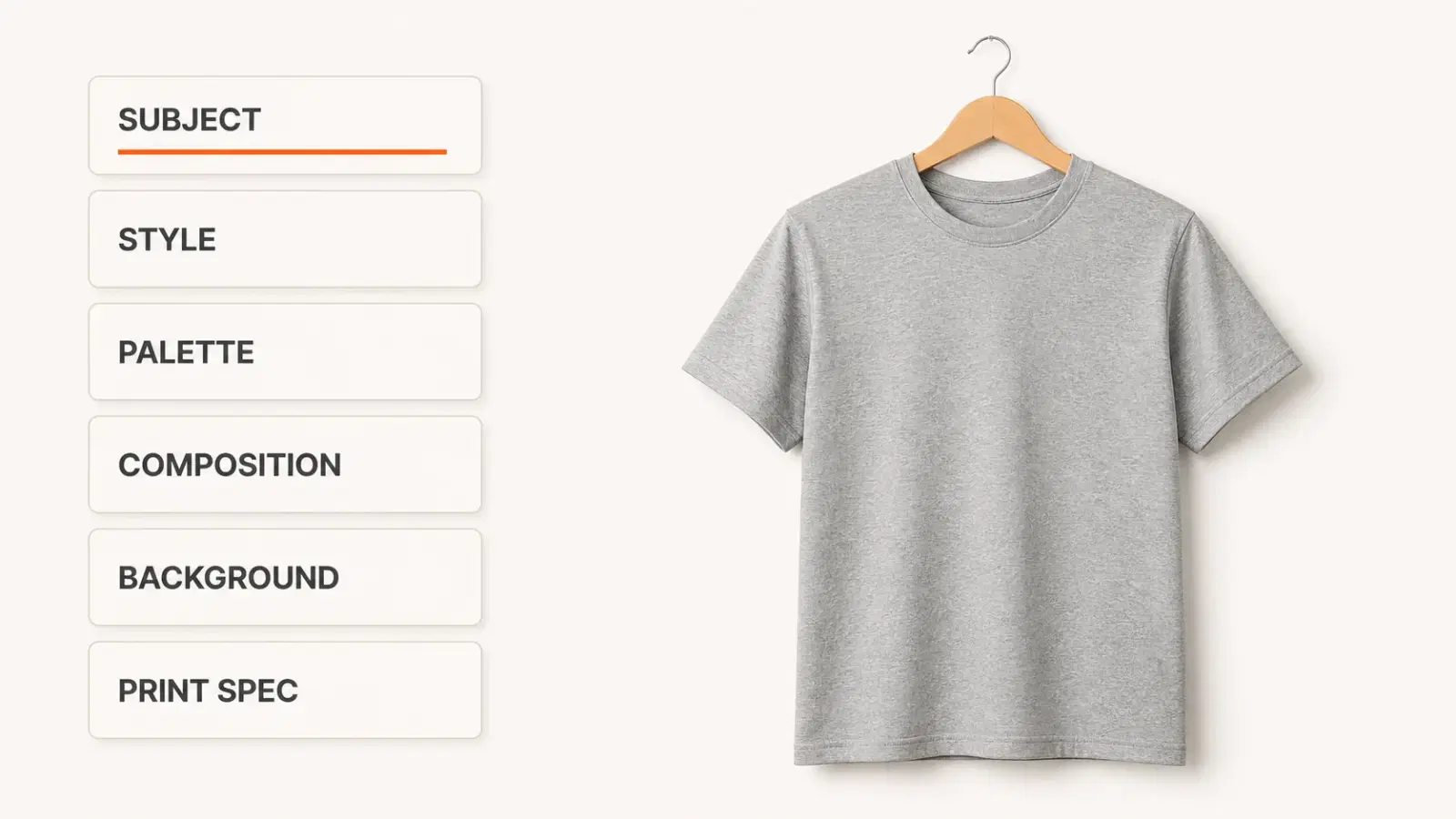
The best AI prompts for clothing design specify six things: subject, art style, color palette, composition, background, and print specification. The last two are the ones most people skip, and they're the reason a design that looks incredible on screen turns to mud on a press.
Here's the part nobody tells you. Search for AI t-shirt design prompts and you'll find dozens of free lists, plus a whole cottage industry of paid prompt packs on Gumroad selling curated Midjourney collections for print-on-demand sellers. People are paying for prompts. That tells you the free ones aren't working well enough.
They aren't working because almost all of them optimize for the screenshot. They teach you to describe a mood, a lighting setup, a camera angle. Then you send the file to a printer and discover that soft gradients band on direct-to-garment (DTG), thin linework vanishes into the fabric weave, and the crisp 1,024-pixel image you were admiring is about 3.4 inches wide at print resolution.1
You already know the frustrating part: the design was never the problem. The brief was.
This guide gives you 22 prompts organized by style, plus the technical specs that make them printable. You'll learn how graphic prompts differ from garment prompts, how your print method changes what you type, and how to diagnose an unprintable file before you waste a sample order on it.
Key Takeaways
- A print-ready prompt needs six parts: subject, style, palette, composition, background, and print spec. Most prompt guides cover the first three and skip the rest.
- Printful recommends 300 DPI for print files and accepts 150 DPI as a floor. A 12″ × 16″ DTG print area at 300 DPI means a 3,600 × 4,800 pixel file.12
- Standard AI image output runs about 1,024 pixels square, which is roughly 3.4 inches at 300 DPI. Upscaling is a required step, not an optional one.1
- DTG and all-over print (AOP) need opposite prompts. DTG wants centered composition on a transparent background. AOP wants a seamless repeat with bleed and relaxed registration.
- The blank decides your palette before you type a word. Heather and pigment-dyed garments shift printed color in ways a white mockup will never show you.
What Makes an AI Clothing Design Prompt Work
A good prompt is a production brief, not a mood board. It tells the model what to draw and what constraints the file has to survive.
The Six Parts of a Print-Ready Prompt
- Subject: what the design depicts.
- Art style: screenprint, flat vector, woodcut, halftone.
- Color palette: name the colors, cap the count.
- Composition: centered, symmetrical, or badge-shaped.
- Background: transparent or solid white.
- Print specification: resolution, flat color, clean edges.
Each part does real work. Be concrete on subject ("a snarling wolf head," not "something wild"), because vague nouns produce generic art. Cap your palette, because fewer colors print cleaner and cost less on screenprint. Composition decides how the design sits on a chest, and background is non-negotiable for anything going on a blank.
Miss the last three and you're gambling. A model given only subject, style, and palette will happily hand you a beautiful illustration with a soft-focus background baked in.
Why "Beautiful" and "Printable" Are Different Goals
Image models are tuned to produce images people like looking at. That means atmospheric lighting, depth of field, subtle gradients, and rich detail. Every one of those instincts works against a garment print.
Screens are backlit and show millions of colors. Fabric is absorbent, textured, and dyed. A gradient that reads as smooth on your monitor can band into visible stripes when DTG ink hits a cotton weave.
So the job of your prompt is partly to suppress the model's default behavior. That's why negative constraints, telling it what not to do, do so much work here.
See the difference for yourself. Our prompt library has ready-to-use prompts already structured this way, organized by bestsellers, niches, and seasonal themes.
Graphic Prompts vs. Garment Prompts: Two Different Jobs
This is the distinction that trips up most people searching for AI prompts for clothing design, and almost no guide separates them cleanly.
Graphic prompts design the artwork that gets printed onto an existing blank. You're making a PNG that goes on a Bella Canvas 3001. The garment already exists. You're decorating it.
Garment prompts design the piece of clothing itself: silhouette, fabric, drape, seams, hardware. These describe something a manufacturer would need to construct. Fashion design tools lean this way.
Here's how to tell which you need. If you're selling through print-on-demand, you want graphic prompts, every time. If you're developing cut-and-sew pieces with a factory, you want garment prompts, and you'll need tech packs that no image model produces.
The two need genuinely different vocabulary:
| Graphic prompt | Garment prompt | |
|---|---|---|
| Describes | Artwork for printing | The garment's construction |
| Key terms | Flat vector, halftone, centered, transparent background | Silhouette, drape, seam, French terry, boxy fit |
| Output | Print-ready PNG | Concept visual, not a production file |
| Used for | Print-on-demand, DTG, screenprint | Cut-and-sew development, line sheets |
Most people searching for clothing design prompts want the left column and land on articles teaching the right one. If your generated "design" shows a model wearing an outfit, you've got a garment visual, not a print file.
22 AI Prompts for Clothing Design, by Style
Copy these directly, then swap the subject for your niche. Every one already includes composition, background, and print specs.
Vintage and Retro
Vintage 1970s screenprint of a soaring eagle over mountain range, distressed texture, three-color palette of burnt orange, cream, and forest green, centered badge composition, transparent background, flat color, no gradients, print readyRetro sunset with palm silhouettes, 1980s sun-fade aesthetic, four flat colors, horizontal stacked composition, subtle halftone grain, transparent background, crisp edges, no photorealismWeathered vintage varsity crest, collegiate lettering, two-color cream and navy, symmetrical shield composition, distressed overlay, transparent background, flat vector, print ready1960s psychedelic wavy typography frame, limited palette of mustard, rust, and off-white, circular composition, bold outlines, transparent background, no gradients
Minimalist and Line Art
Single continuous line drawing of a mountain range, one color black, generous negative space, centered composition, thick uniform stroke weight, transparent background, vector styleMinimalist geometric sun and wave, two flat colors, balanced circular composition, clean hard edges, no shading, transparent background, print readySimple line art botanical sprig, single-color sage green, vertical composition, medium stroke weight, no fine detail, transparent backgroundAbstract minimal face outline, one continuous stroke, black on transparent background, centered, bold line weight, no gradients, no texture
Bold Typography
Heavy condensed sans-serif wordmark reading BUILT DIFFERENT, stacked three-line composition, two-color cream and black, slight distress, transparent background, flat color, print readyChunky retro script lettering with hard drop shadow, three flat colors, horizontal composition, thick outlines, transparent background, no gradientsBold block typography arranged in a circular badge with a small star icon, single color, high contrast, transparent background, vector style, crisp edgesStencil-style military lettering, distressed spray texture, one color, centered composition, transparent background, flat, no photorealism
Niche and Hobby
Vintage screenprint of a powerlifting barbell with laurel wreath, three-color earth tone palette, centered badge composition, distressed texture, transparent background, flat colorRetro pixel art game controller, eight-color limited palette, centered composition, hard pixel edges, no anti-aliasing, transparent background, print readyLine art illustration of a French bulldog wearing sunglasses, two-color black and coral, centered, bold uniform strokes, transparent background, no shadingVintage cartography-style hiking trail map badge, two flat colors, circular composition, fine but not hairline linework, transparent background, flat print ready
Seasonal and Trend-Driven
Cozy autumn scene with layered pumpkins and leaves, four-color warm palette, centered stacked composition, flat illustration, transparent background, no gradientsHalloween vintage horror poster style, ghost and moon, three-color palette of black, bone white, and blood orange, centered composition, halftone shading, transparent backgroundMinimalist holiday evergreen forest silhouette, two flat colors, horizontal composition, clean edges, transparent background, print readyRetro New Year celestial burst with stars, gold and black two-color, circular composition, bold flat shapes, transparent background, no gradients
Streetwear and All-Over Print
Bold streetwear graphic with layered abstract shapes and heavy outlines, four-color high-contrast palette, oversized centered composition, flat color, transparent background, print readySeamless repeating pattern of small abstract geometric shapes, four-color palette, tileable on all four edges, even distribution with no obvious focal point, continuous edge-to-edge coverage, designed for all-over print
Notice that number 22 breaks every rule the others follow. That's not a mistake, and it's the section most prompt guides never write.
Philip Anders walks through generating text-based tee designs in Ideogram, a useful watch if garbled lettering is your recurring failure.
DTG vs. AOP: How Your Print Method Changes the Prompt
Direct-to-garment and all-over print want opposite files. Prompting the same way for both is the fastest route to a design you can't use.
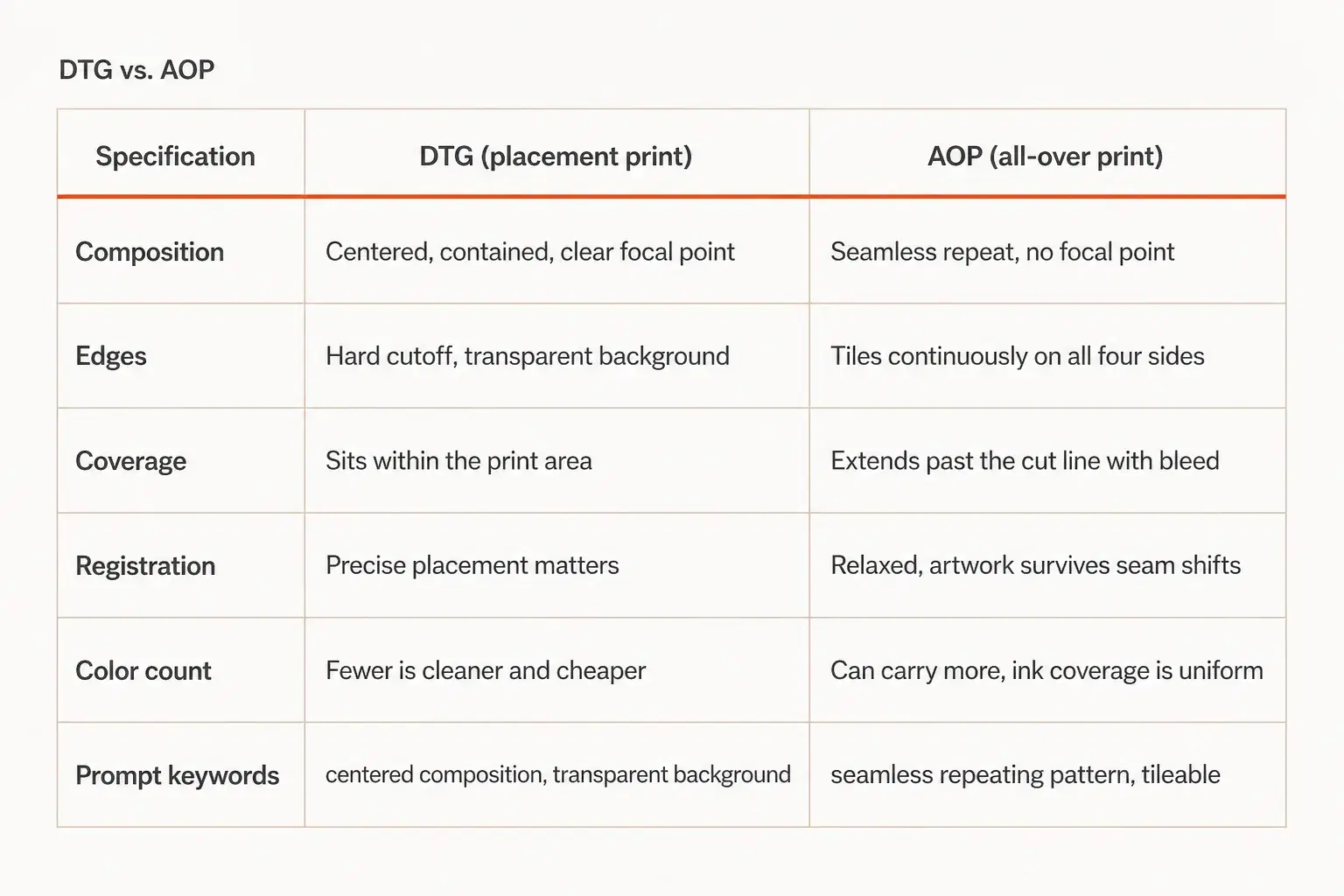
| Specification | DTG (placement print) | AOP (all-over print) |
|---|---|---|
| Composition | Centered, contained, clear focal point | Seamless repeat, no focal point |
| Edges | Hard cutoff, transparent background | Tiles continuously on all four sides |
| Coverage | Sits within the print area | Extends past the cut line with bleed |
| Registration | Precise placement matters | Relaxed, artwork survives seam shifts |
| Color count | Fewer is cleaner and cheaper | Can carry more, ink coverage is uniform |
| Prompt keywords | "centered composition, transparent background" | "seamless repeating pattern, tileable" |
DTG Prompts: Centered, Transparent, Restrained
DTG prints inside a fixed rectangle. Printful's DTG guidance puts the maximum print area at 12″ × 16″, expanding to 15″ × 18″ on select products.
That constraint should shape your prompt. Ask for a centered composition with a clear silhouette and a transparent background. Skip fine detail that won't survive at chest scale.
AOP Prompts: Seamless, Bleeding, Forgiving
AOP wraps the whole fabric panel, then the garment gets cut and sewn from it. Your artwork has to tile seamlessly, extend into a bleed area, and tolerate imprecise placement because seams and collars will land wherever they land.
This is why AOP prompts must say "seamless repeating pattern" and "tileable." A gorgeous centered graphic is useless here. It'll get sliced across a side seam.
Designs with large solid fills also expose every imperfection at seams and folds, so patterns with distributed detail hide construction variance better than flat expanses of a single color.
The Specs to Append to Every Prompt
For DTG, append: centered composition, transparent background, flat color, no gradients, crisp edges, print ready
For AOP, append: seamless repeating pattern, tileable on all edges, even distribution, continuous coverage, no focal point
Append these and you've turned a generic request into print-ready AI prompts that carry their own production constraints.
Ready to test the difference? Vaybel's AI Design Generator knows which specs a DTG file needs versus an AOP panel, so the constraint gets applied before you generate rather than after you've wasted a print.
Prompt for the Blank You're Actually Printing On
Here's a step that gets skipped constantly: your blank changes your palette before you type anything.
Heather, Solid, and Pigment-Dyed
DTG ink sits on the fabric rather than replacing its color. On a heather blank, the flecked yarn shows through and slightly desaturates everything you print. Colors that look punchy on a mockup go quieter on the real garment.
Pigment-dyed blanks like Comfort Colors 1717 have a soft, washed character that fights high-saturation neon graphics. A muted, earthy palette suits them. A vivid one looks borrowed from a different product.
So if you know your blank, name that constraint in the prompt: muted earth-tone palette suited to a washed pigment-dyed garment.
Light Garments vs. Dark Garments
Dark garments need a white underbase so colors read at all, which slightly thickens the print hand and can flatten subtle tonal shifts. Designs with high internal contrast survive this better than ones relying on close tonal values.
A practical rule: if your design's shapes are only distinguishable by subtle brightness differences, it will struggle on a dark blank. Ask for high-contrast flat shapes instead.
Choosing blanks deliberately is worth its own research, and it pairs directly with prompt decisions.
When the Output Isn't Printable: Six Failures and Fixes
Every one of these is diagnosable from the file, before you order a sample.
| Failure | What causes it | Prompt fix |
|---|---|---|
| Muddy, unreadable detail | Too much fine detail at chest scale | Add bold simplified shapes, minimal fine detail |
| Garbled text | Image models render lettering unreliably | Generate without text, add type in an editor afterward |
| Gradient banding on DTG | Smooth gradients hitting textured fabric | Add flat color only, no gradients, no soft shading |
| Linework that disappears | Strokes too thin for fabric weave | Add thick uniform stroke weight, no hairlines |
| Background baked in | Model defaulted to a scene | Add isolated on transparent background, no scenery |
| Resolution too low | Native output far below print size | Upscale to your print area at 300 DPI1 |
The Resolution Gap Is Real Math
This one deserves its own numbers because it catches nearly everyone.
Printful recommends 300 DPI for print files, with 150 DPI as the accepted floor. Work the arithmetic: a 12″ × 16″ print area at 300 DPI needs a 3,600 × 4,800 pixel file. A 15″ × 18″ area needs 4,500 × 5,400.
Standard AI image output lands around 1,024 pixels square.3 At 300 DPI, that's about 3.4 inches, roughly the size of a coaster.
So upscaling isn't a nice-to-have step you can skip when you're in a hurry. It's mandatory, and any workflow that doesn't include it is producing files that will print soft.
Where the Prompt Stops and the Pipeline Starts
Follow most prompt guides to their conclusion and you end up holding a PNG and a to-do list. Generate in one tool, upscale in another, remove the background in a third, then bulk-upload through a fourth.
That chain is where the time goes. Each handoff means re-exporting, re-checking specs, and re-uploading, and each one is a place where the file quietly stops meeting requirements.
A connected workflow collapses those steps. Generate the design with print constraints already applied, render mockups on real blanks, generate the listing copy, and publish to TikTok Shop, Etsy, and Shopify from one place. That's where AI prompts for clothing design stop being isolated experiments and start being the first step in a pipeline.
If you're still deciding which generator to use in the first place, our breakdown of AI design tools for clothing brands compares the categories and where each fits.
Frequently Asked Questions
What is the best format for AI t-shirt design prompts?
Subject, art style, color palette, composition, background, and print specification, in that order. A working example: vintage screenprint of a mountain range, three-color earth palette, centered badge composition, transparent background, flat color, no gradients.
Why do my AI designs look blurry when printed?
Almost always resolution. A standard 1,024-pixel output is about 3.4 inches at 300 DPI, while a full-front DTG print area needs roughly 3,600 × 4,800 pixels.13 Upscale before uploading.
Can I sell AI-generated clothing designs?
Major print-on-demand marketplaces currently accept AI-generated artwork. The real risk isn't the AI, it's the subject matter. Prompting for copyrighted characters, band logos, or trademarked phrases creates a takedown exposure no prompt tweak fixes.
How many colors should an AI t-shirt design use?
For DTG, two to four flat colors reproduce most reliably and read clearly at chest scale. Screenprint gets more expensive per color, so fewer colors also protects your margin.
Do print on demand AI prompts work differently for all-over print?
Yes, and this is the biggest gap in most prompt guides. AOP needs a seamless tileable pattern with bleed and no focal point, which is the opposite of the centered, transparent-background composition DTG wants.
The Prompt Is a Production Brief
The difference between a design that sells and a file you throw away usually isn't creative. It's specification. The best AI prompts for clothing design read like production briefs, not mood boards.
Five things to carry forward:
- Write six-part prompts. Subject, style, palette, composition, background, print spec.
- Decide graphic or garment before you type. They need different vocabulary.
- Match the prompt to the print method. DTG wants centered and transparent, AOP wants seamless and tileable.
- Let the blank set your palette. Heather and pigment-dyed garments shift color.
- Check resolution against real print math. 300 DPI across your actual print area.1
You don't need a design degree to build a clothing brand worth buying from. You need AI prompts for clothing design specific enough that what comes out of the generator is what goes on the garment.
Pick three prompts from this guide, swap in your niche, and run them. Then check each output against the failure table before you order a single sample.
Start your free trial → and generate your first print-ready design in under 60 seconds. If you're earlier in the process, start with how to start a clothing brand with AI.
Sources
Footnotes
-
Printful, "Create the perfect DTG file." Maximum DTG print area of 12″ × 16″, expanding to 15″ × 18″ on select products; PNG required. https://www.printful.com/creating-dtg-file ↩ ↩2 ↩3 ↩4 ↩5 ↩6
-
Printful, "Everything you need to know to prepare the perfect print file." 300 DPI recommended across products, 150 DPI accepted floor for most garments. https://www.printful.com/blog/everything-you-need-to-know-to-prepare-the-perfect-printfile ↩
-
Midjourney documentation, "Upscalers." Standard-definition images generate at 1,024 × 1,024 pixels at the default aspect ratio, with Subtle and Creative upscalers reaching 2,048 × 2,048. https://docs.midjourney.com/hc/en-us/articles/32804058614669-Upscalers ↩ ↩2